
n8n is a genuinely great tool. It's open source, self-hostable, has hundreds of integrations, and a large active community. If you're automating business processes — syncing CRMs, routing webhooks, connecting SaaS tools — it's hard to beat.
This article isn't about whether n8n is good. It is. It's about a specific scenario where the two tools diverge: pipelines where the primary work is done by AI models. Chaining LLM calls, generating images, extracting structured data, routing based on model output. That's where the difference starts to matter.
How they're designed differently
n8n is a general-purpose automation platform. AI capabilities were added on top of a foundation built for connecting business applications.
AI-Flow is built specifically for AI model pipelines. The node set, the canvas, the output handling — everything is oriented around calling models, routing their outputs, and iterating on the results.
Working with AI models directly
In n8n, native AI nodes cover OpenAI and Anthropic basics. For anything outside that list — a specific Replicate model, a newer Gemini variant, a specialized image model — you reach for the HTTP Request node and write the API call yourself. That means handling the schema, authentication, polling for async results, and managing file URLs manually.
AI-Flow has dedicated nodes for Claude, GPT, Gemini, Grok, DeepSeek, DALL-E, Stability AI, and a Replicate node that gives you access to 1000+ models through a searchable catalog. You pick a model, the node generates the input form from the model's schema, and you connect it to the rest of the pipeline. No raw API calls to write.
Every parameter the model exposes is available in the node — nothing is abstracted away or hidden behind simplified controls. If the model has 15 input fields, you see all 15.
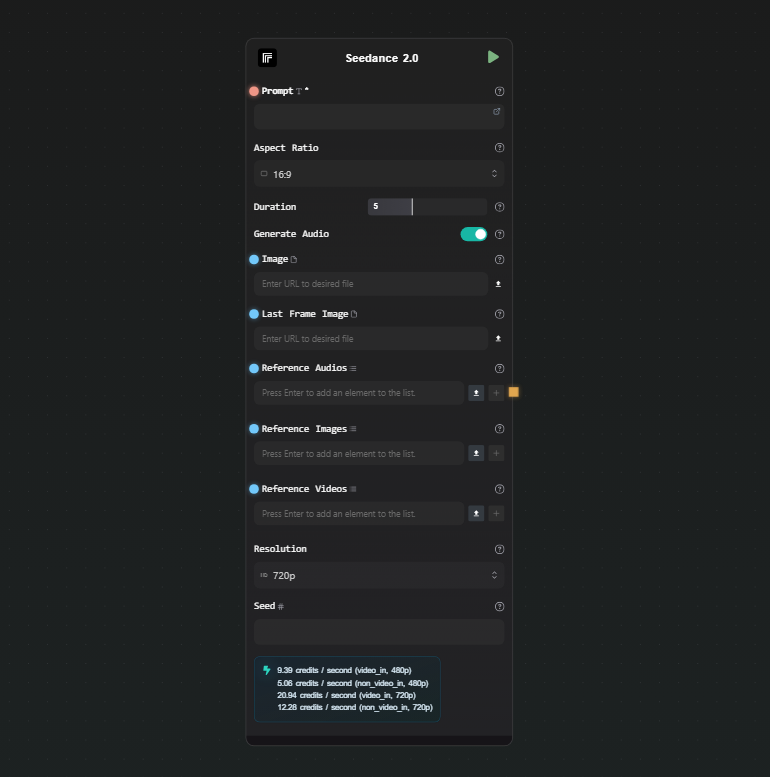
This matters most during iteration. When you're tweaking a pipeline — swapping a model, adjusting a parameter, comparing outputs — doing it through a visual node is faster than editing API call parameters in code or HTTP request bodies.
Structured output
A common pattern in AI pipelines: use an LLM to extract structured data from unstructured input — a document, a customer message, a product listing — and feed the result into downstream steps.
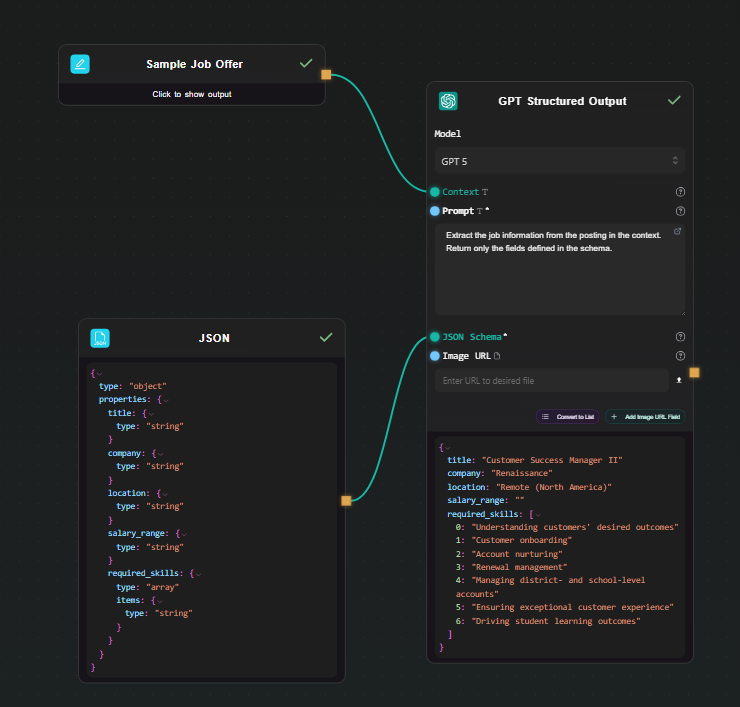
AI-Flow has dedicated GPT Structured Output and Gemini Structured Output nodes. You define a JSON Schema in the node, and the model is constrained via native structured output mode — it always returns a valid object matching that schema. The output is a native JSON object that downstream nodes work with directly. No parsing code, no validation loop.
{
  "type": "object",
  "properties": {
    "sentiment": { "type": "string" },
    "score": { "type": "number" },
    "key_topics": {
      "type": "array",
      "items": { "type": "string" }
    }
  }
}
Define that schema, write a prompt, and every run returns that exact structure regardless of input variation.
Visual iteration on model pipelines
n8n's canvas works well for automation logic. For AI pipelines specifically, the visual feedback loop matters more — you're often running a chain multiple times, looking at intermediate outputs, adjusting a prompt, and running again.
AI-Flow's canvas shows live output beneath each node as the workflow runs. You can see the result of each step — the LLM output, the extracted JSON, the generated image — without navigating away from the canvas. When something looks wrong, you can identify exactly which node produced it.
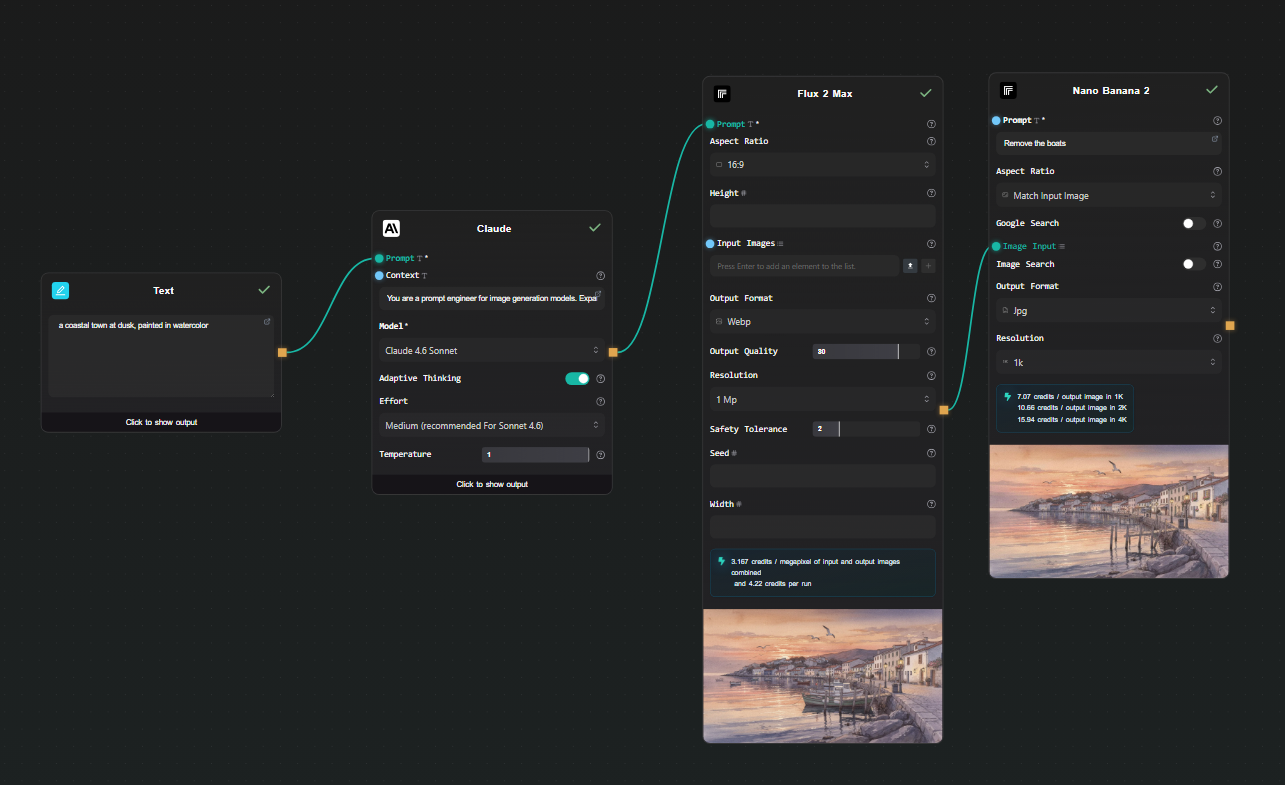
This isn't a feature n8n lacks so much as a different design priority — AI-Flow treats the canvas as an interactive scratchpad for building and debugging model pipelines, not just a diagram of a deployed automation.
BYOK and cost model
Both tools support BYOK. In AI-Flow, you add your Anthropic, OpenAI, Replicate, and Google keys once in the secure key store — every node in every workflow uses them automatically. You pay the model provider directly at their rate. AI-Flow's platform fee is a one-time credit purchase, not a subscription, and there's no markup on what you pay to providers.
For workflows running heavy model workloads, that cost structure is worth understanding before choosing a platform.
Exposing pipelines as APIs
Both tools let you call a workflow from an external application. In n8n, you configure a Webhook trigger node. In AI-Flow, you add an API Input node at the start and an API Output node at the end — AI-Flow generates a REST endpoint with an API key automatically. You can also expose the workflow as a simplified form-based UI without any frontend code, which is useful for sharing a pipeline with non-technical collaborators.
When to use n8n
If your automation connects business applications — CRMs, databases, Slack, email, hundreds of SaaS tools — n8n is the right choice. It has deeper integrations, a larger community, self-hosting options, and years of production use behind it. AI-Flow has some utility integrations (HTTP, Webhooks, Notion, Airtable, Telegram) but it's not competing on that dimension.
When to use AI-Flow
If the pipeline's primary work is model calls — chaining LLMs, generating images or video, extracting structured data, routing based on model output — AI-Flow is designed for that. The model coverage is broader, structured output is a first-class feature, the canvas is built for iterating on prompts and parameters, and every model parameter is exposed without abstraction.
The specific cases where it tends to matter:
- You need models beyond OpenAI and Anthropic basics, especially Replicate's catalog
- You want structured JSON output without writing parsing code
- You're iterating quickly on prompt chains and want visual feedback at each step
- You want to expose the pipeline as a REST API with minimal setup
- You want to avoid per-execution platform fees on top of model costs
If you're building something AI-model-heavy, the templates library has pre-built pipelines to start from. The free tier works with your own API keys — open AI-Flow and try building the pipeline there.