
AI-Flow
Create Product Videos from Images with Seedance 2.0
Create cinematic product videos from images with Seedance 2.0—turn static product shots, environments, and logos into polished, motion-designed ads in seconds.
Inputs

Output
About This Template
Transform your product images into high-quality marketing videos with Seedance 2.0. Upload your product, background/environment, and brand logo, then describe the motion and style you want. The model composes everything into a cohesive scene with realistic lighting, reflections, and smooth camera moves—no filming or manual editing required. Built for ecommerce and performance marketing, this template preserves the exact look and proportions of your product while adding premium motion design: hero reveals, slow orbits, push-ins, particle accents, and clean logo outros. It’s ideal for social ads, PDP videos, launch teasers, and brand content that needs to look production-ready—fast. You control the narrative with a structured prompt (Subject, References, Animation, Camera, Style, Final Moment, Constraints). Provide multiple reference images to guide environment, materials, and brand identity. Optionally enable synchronized audio for music, SFX, or simple VO. Choose aspect ratios for any platform, set duration, and export in crisp 720p. Go from static assets to a cinematic, on-brand product video in minutes.
How to Use This Template
Step 1: Enter your text in 'Prompt' Node
Fill the 'Prompt' node with the required text.
Subject:
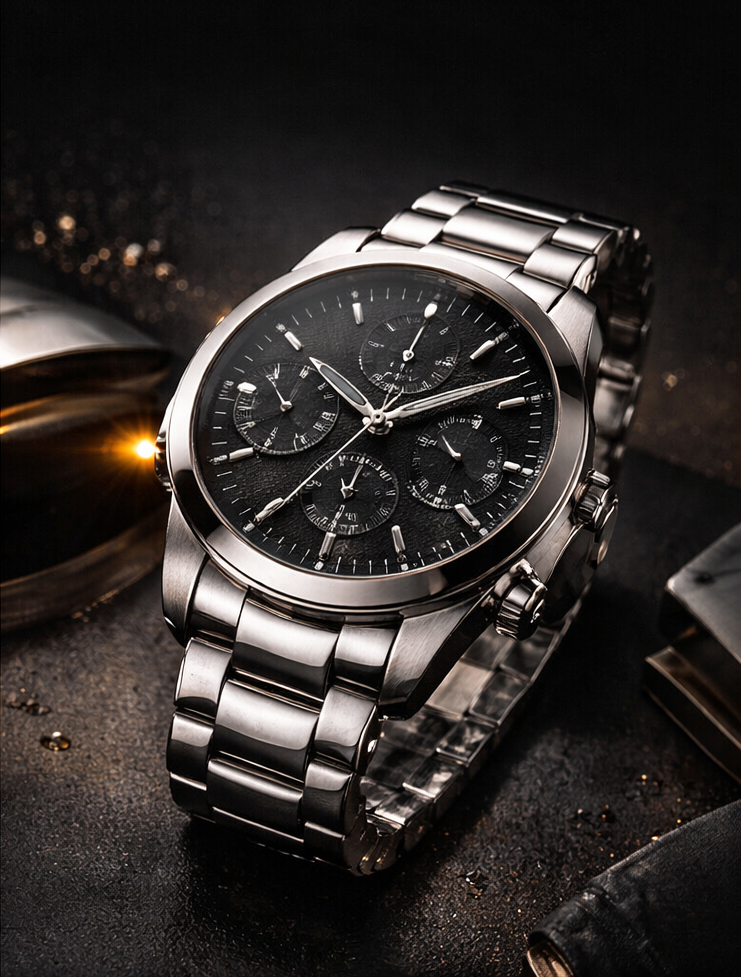
Luxury wristwatch from [Image1], premium stainless steel design, black dial, highly detailed, reflective surfaces

References Usage:
use the watch from [Image1] as the main subject
use [Image2] as the environment and background style (dark luxury, golden reflections, abstract light streaks)
use [Image3] as the brand logo for the final reveal

Animation:
The watch appears in darkness → soft golden light sweeps across the surface revealing details → the watch slowly rotates in place → subtle particles and reflections move in the background → transition to a clean hero angle

Camera:
slow cinematic orbit around the watch → smooth push-in toward the dial → final centered framing

Style:
luxury commercial, high contrast lighting, deep blacks and gold highlights, clean and premium, cinematic product ad

Final Moment (KEY):
The scene fades slightly darker → [Image3] logo appears with a soft golden glow → logo centered, clean, minimal background

Constraints:
no deformation of the watch, preserve exact product shape from [Image1]
no distortion, no extra elements
clean reflections, smooth motion
logo from [Image3] must be sharp and readable
Step 2: Upload your files
In the 'List' node, upload the files you want to use in the workflow.
Step 3: Run the Flow
Click the 'Run' button to execute the flow and get the final output.
Who is this for?
Perfect for professionals and creators looking to streamline their workflow
Ecommerce brands and DTC founders
Quickly turn product photos into scroll-stopping video ads and PDP loops without a studio or editor.
Performance marketers and growth teams
Produce high-converting creative variations across aspect ratios and channels in minutes.
Creative directors and motion designers
Prototype cinematic product reveals and logo outros rapidly, then refine with prompt-level control.
Agencies and production studios
Scale premium-looking product videos for multiple SKUs and clients while preserving brand fidelity.
Marketplace and retail sellers
Upgrade listings with professional motion, lighting, and hero angles from existing product shots.
Content creators and social teams
Generate platform-ready vertical or horizontal product videos tailored to each channel’s best practices.
You Might Also Like
Explore other powerful templates to enhance your AI workflow
Kling V2.6
Kling V2.6 is a pro-grade AI video generator that turns text or a single image into cinematic 1080p clips with fluid motion and native, synchronized audio (dialogue, ambience, and effects).
UGC Ad Creation Workflow – From Script to Video
End-to-end UGC ad builder that turns a subject photo, a product photo, and an optional script into a ready-to-run first-frame image and an 8s vertical video with voice and natural handheld motion.
Generate realistic lipsync animations from audio
Generate realistic lip‑sync animations from any audio track. PixVerse Lipsync aligns mouth movements to the speech with natural timing and expressions.
Kling V2.5 Turbo Pro
Kling 2.5 Turbo Pro: Unlock pro-level text-to-video and image-to-video creation with smooth motion, cinematic depth, and remarkable prompt adherence.
Sora 2
Latest version of Sora, with higher-fidelity video, context-aware audio, reference image support
Veo 3.1
New and improved version of Veo 3, with higher-fidelity video, context-aware audio, reference image and last frame support
Frequently Asked Questions
What does this template do?
It converts your product images into polished product videos using Seedance 2.0—combining your subject, environment, and logo into a cinematic ad with realistic lighting, reflections, and smooth camera movement.
What assets should I upload?
At minimum, a high-quality product image. For best results, add a background/environment reference and a brand logo for the final reveal. You can also include optional reference audio for rhythm, SFX, or VO guidance.
How many reference images can I use?
You can provide multiple references (e.g., product, environment, logo) and reference them in your prompt as [Image1], [Image2], [Image3], etc. This helps with style consistency and scene composition.
Does it preserve the exact product shape and details?
Yes. The template is designed to avoid deformation and keep your product’s geometry and key details intact, including materials, dial faces, and logos on the item.
Can I control camera moves and lighting?
Yes. Use the prompt to define animation beats (reveal, rotation, hero angle), camera paths (orbit, push-in, centered framing), and lighting style (high contrast, golden highlights, deep blacks, etc.).
Does it support audio?
Yes. You can enable synchronized audio to generate background music and SFX. If you include dialogue in quotation marks within your prompt, the model will sync it to the video. You can also provide short reference audio clips.
Which aspect ratios and durations are supported?
Common aspect ratios such as 16:9, 9:16, 1:1, and more are supported. Set durations up to 15 seconds, or choose a shorter length for snappier ads.
What output quality can I expect?
The template generates smooth, cinematic motion with realistic lighting and reflections, and exports up to 720p by default for crisp social-ready results.
Can I create a logo reveal at the end?
Absolutely. Include your logo as a reference image and describe the final moment (e.g., fade to darker scene, soft golden glow, centered minimal background) to produce a clean branded outro.
Can I start from a specific first or last frame?
Yes, you can guide the first and/or last frame for storyboard-like control. Note that this cannot be combined with multiple reference images in the same run.
Any tips for best results?
Use high-resolution, well-lit product photos with clear edges; add an environment reference that matches your desired mood; keep prompts structured and specific; and avoid cluttered backgrounds that compete with the subject.
What types of content is this best for?
Premium product showcases, launch teasers, PDP loops, paid social ads, and brand videos that benefit from cinematic lighting, subtle particles, and controlled camera motion.
What is AI-FLOW and how can it help me?
AI-FLOW is an all-in-one AI platform that allows you to build, integrate, and automate AI-powered workflows using an intuitive drag-and-drop interface. Whether you're a beginner or an expert, you can leverage multiple AI models to create innovative solutions without any coding required.
Is there a free trial available?
Yes, AI-FLOW offers a free trial to get you started. After that, you can purchase credits as needed—no subscription or long-term commitment required.
Can I integrate my API keys from providers like OpenAI and Replicate with AI-FLOW Cloud Version ?
Yes, you can easily integrate your existing API keys with AI-FLOW. If specified, nodes related to the API Key provided will use your API key, significantly reducing your platform credit usage.