
AI-Flow
Speech 2.6 Hd
MiniMax Speech 2.6 HD delivers studio-grade, multilingual text-to-speech with nuanced prosody, subtitle export, and 300+ premium voices plus voice cloning support.
About This Template
MiniMax Speech 2.6 HD is a high-definition text-to-audio model for premium voiceovers, audiobooks, marketing content, and any use case that demands realistic delivery and expressive control. It supports 40+ languages, 300+ system voices, and custom voice cloning (via voice_id), while giving you fine-grained control over speed, pitch, volume, format, and sample rate. Key capabilities: - Expressive prosody with emotion control (auto, calm, happy, sad, angry, fearful, disgusted, surprised, fluent, neutral) - Multilingual synthesis with optional language hints and dialect boosts - 300+ system voices and voice cloning (use a voice_id from the MiniMax voice cloning workflow) - Subtitle metadata with sentence-level timestamps for easy captioning (non-streaming) - Flexible audio output: MP3 for general use, WAV/FLAC for lossless, PCM for raw bytes - Production-friendly controls: speed (0.5–2.0), pitch (−12 to +12 semitones), volume (0–10), mono or stereo channels, and multiple sample rates How it works: - Provide up to 10,000 characters of text; insert pauses with markers like <#0.5#> - Pick a voice_id (system or cloned), choose emotion and language hints if needed - Set audio_format, bitrate, sample_rate, channel, speed, pitch, and volume - Optionally enable subtitle_enable to receive sentence-timestamped subtitle metadata When to use HD vs Turbo: - Use Speech 2.6 HD for maximum fidelity and expressive performances suitable for post-production - Use Speech 2.6 Turbo when you need low-latency, interactive, or real-time experiences Best practices: - Choose FLAC or WAV for editing and post-production workflows - Use english_normalization to improve reading of numbers and dates in English scripts - Set language_boost to Automatic or a specific language to improve multilingual consistency - Download and store the returned audio file; hosted links are typically temporary
Template Workflow
How to Use This Template
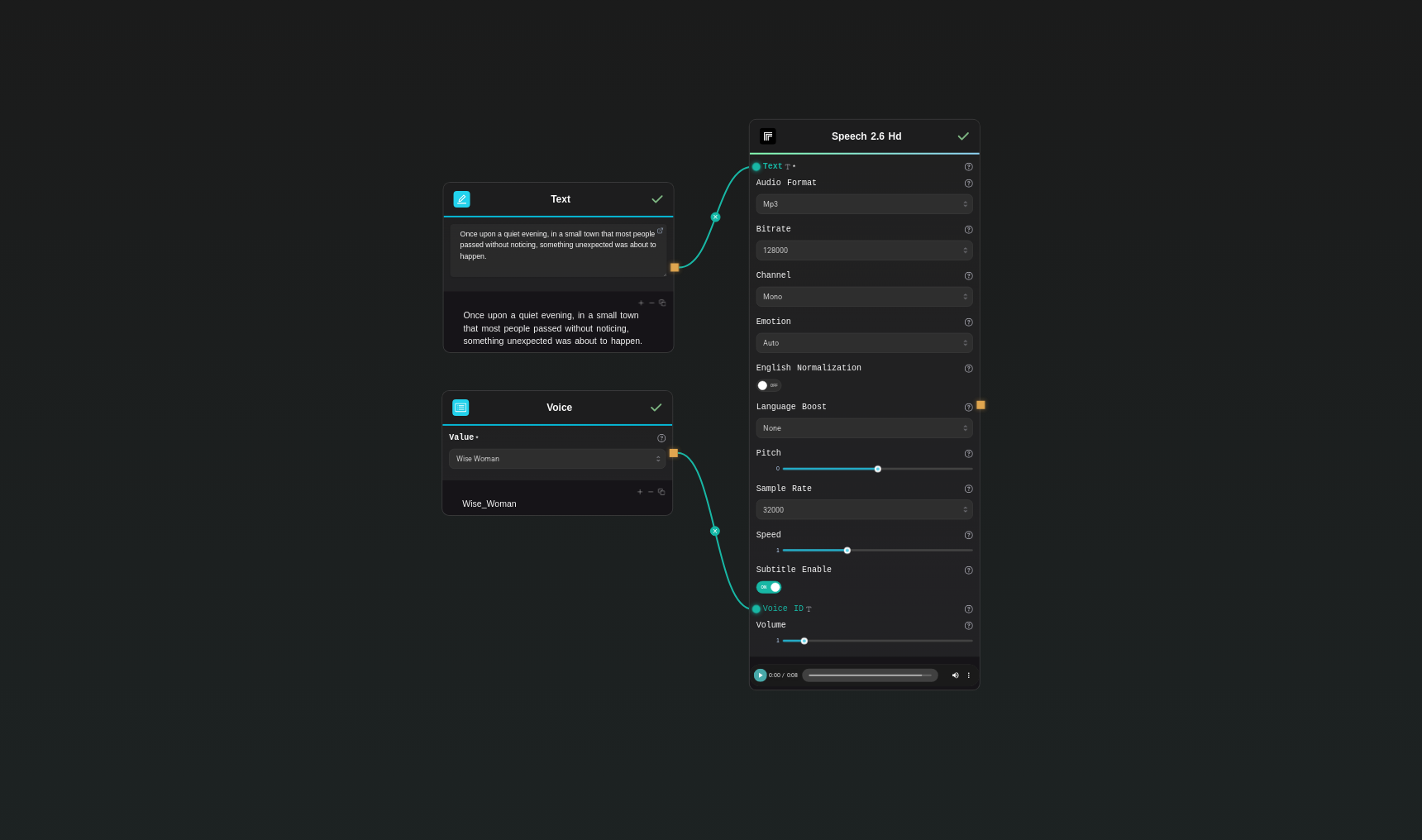
Step 1: Enter your text in 'Text' Node
In the 'Text' node, enter your instructions.
Once upon a quiet evening, in a small town that most people passed without noticing, something unexpected was about to happen.
Step 2: Configure 'Voice' Node
Configure the 'Voice' node as needed.
Wise_Woman
Step 3: Run the Flow
Click the 'Run' button to execute the flow and get the final output.
Who is this for?
Perfect for professionals and creators looking to streamline their workflow
Creative and marketing teams
Produce high-fidelity voiceovers for product demos, ads, explainers, and branded content in multiple languages.
Publishers and audiobook creators
Generate expressive long-form narration with consistent delivery, accurate pacing, and clean audio for post-production.
Localization and operations teams
Scale multilingual voice output with language hints, emotion control, and predictable settings for consistency.
Developers and product teams
Integrate turnkey TTS via Replicate’s API, controlling voice, speed, pitch, format, and subtitles for various apps.
Game, animation, and podcast producers
Create dialogue and narration tracks using premium voices or cloned voices with expressive control and subtitle metadata.
Accessibility and education
Add high-quality read-aloud, captioned videos, and screenreader-friendly audio with timestamped subtitles.
You Might Also Like
Explore other powerful templates to enhance your AI workflow
Music 1.5
Generate full-length AI songs (up to 4 minutes) with natural vocals and rich instrumentation from your lyrics and a concise style prompt.
Speech 2.6 Turbo
Low-latency, multilingual text-to-speech with 300+ voices and expressive emotions—MiniMax Speech 2.6 Turbo on Replicate.
Frequently Asked Questions
What makes MiniMax Speech 2.6 HD different from 2.6 Turbo?
Speech 2.6 HD prioritizes maximum fidelity and expressive, natural prosody—ideal for voiceovers and audiobooks. Speech 2.6 Turbo focuses on low latency for real-time or interactive scenarios.
Which audio formats are supported?
Choose mp3 for general use, wav or flac for lossless post-production, and pcm for raw byte streams. You can also set bitrate (for mp3), sample_rate, and channel (mono or stereo).
How do I control emotion and delivery?
Set emotion to auto for intelligent matching or choose a specific style such as calm, happy, sad, angry, fearful, disgusted, surprised, fluent, or neutral. You can also fine-tune pitch (−12 to +12) and speed (0.5–2.0).
Does it support multiple languages?
Yes. It supports 40+ languages. Use language_boost to set Automatic or a specific language to improve consistency and pronunciation for your script.
How do I add pauses or control pacing?
Insert pause markers like <#0.5#> directly in your text to add a 0.5-second pause. Combine this with speed and emotion settings for precise pacing.
What are the input limits?
You can submit up to 10,000 characters per request. Multi-paragraph scripts are supported, and you can mix pause markers with regular text.
What sample rates and channels are available?
Common sample rates include 8000–44100 Hz (e.g., 16000, 32000, 44100). Use mono for single-channel output or stereo for two-channel mixes.
Do hosted audio links expire?
Yes. They typically expires after 7 days. Download and store the file in your own infrastructure for long-term use.
Is English number/date reading improved?
Set english_normalization to true to enhance pronunciation and formatting of numbers and dates in English text. This may add minor latency.
When should I choose FLAC or WAV over MP3?
Use FLAC or WAV for editing, mixing, or mastering in post-production. Choose MP3 for lightweight distribution where file size matters.
What is AI-FLOW and how can it help me?
AI-FLOW is an all-in-one AI platform that allows you to build, integrate, and automate AI-powered workflows using an intuitive drag-and-drop interface. Whether you're a beginner or an expert, you can leverage multiple AI models to create innovative solutions without any coding required.
Is there a free trial available?
Yes, AI-FLOW offers a free trial to get you started. After that, you can purchase credits as needed—no subscription or long-term commitment required.
Can I integrate my API keys from providers like OpenAI and Replicate with AI-FLOW Cloud Version ?
Yes, you can easily integrate your existing API keys with AI-FLOW. If specified, nodes related to the API Key provided will use your API key, significantly reducing your platform credit usage.