
AI-Flow
Speech 2.6 Turbo
Low-latency, multilingual text-to-speech with 300+ voices and expressive emotions—MiniMax Speech 2.6 Turbo on Replicate.
About This Template
MiniMax Speech 2.6 Turbo delivers fast, natural text-to-speech optimized for real-time and interactive applications. Choose from 300+ curated voices (or your own cloned voice), switch emotions on the fly, and synthesize lifelike audio in 40+ languages—all with predictable, usage-based pricing. Key capabilities: - Low-latency synthesis ideal for chat agents, voice bots, and UI feedback - 300+ voices plus support for voice cloning via minimax/voice-cloning - Emotions set to auto or explicitly (happy, calm, surprised, neutral, and more) - 40+ languages with optional language boosting for better pronunciation - Flexible audio controls: speed, pitch, volume, sample rate, bitrate, mono/stereo - Export to mp3, wav, flac, or pcm; optional sentence-level subtitles (non-streaming) Inputs at a glance: - text (required): Up to 10,000 characters. Insert pauses with markers like <#0.5#> - voice_id: Any MiniMax system voice or a cloned voice ID - emotion: auto or a specific emotion - audio_format: mp3, wav, flac, or pcm - sample_rate: 8000–44100 Hz; bitrate options for mp3 - channel: mono or stereo - speed, pitch, volume: Fine-tune speaking rate, semitone shift (−12 to +12), and loudness - language_boost: Automatic or a specific language - english_normalization: Improves number/date reading in English (adds slight latency) - subtitle_enable: Returns sentence timestamps in non-streaming mode Output: - A hosted audio file URL (mp3/wav/flac/pcm), with MiniMax metadata such as character count and optional subtitles. Pricing: - $0.06 per 1,000 input tokens (roughly one token ≈ one character) - Audio output is not billed—only input text is counted When to choose Turbo vs HD: - Use Speech 2.6 Turbo for low-latency, interactive experiences - Prefer Speech 2.6 HD for maximum fidelity in long-form content like audiobooks and high-end voiceovers
Template Workflow
How to Use This Template
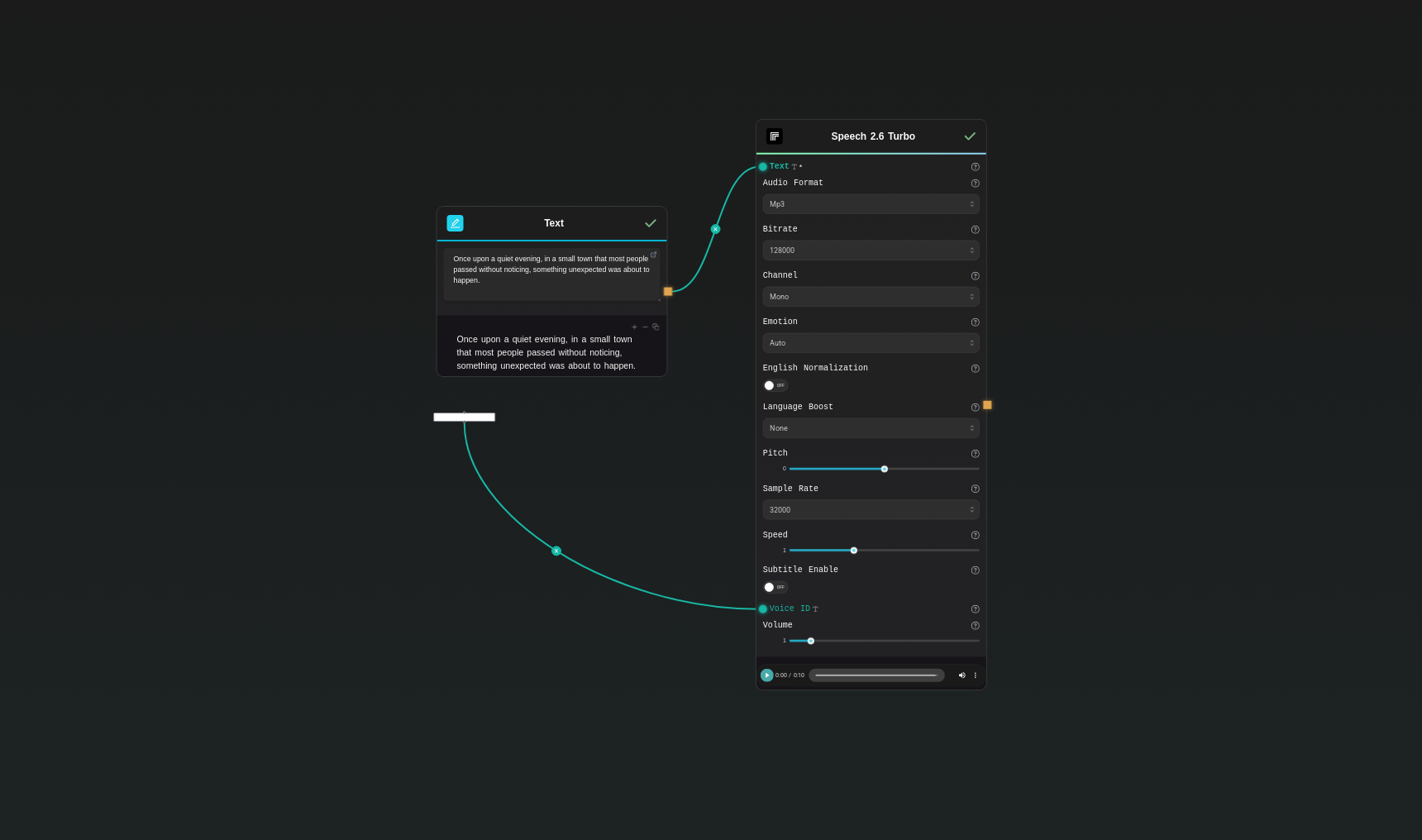
Step 1: Enter your text in 'Text' Node
In the 'Text' node, enter your instructions.
Once upon a quiet evening, in a small town that most people passed without noticing, something unexpected was about to happen.
Step 2: Configure 'Voice' Node
Configure the 'Voice' node as needed.
Wise_Woman
Step 3: Run the Flow
Click the 'Run' button to execute the flow and get the final output.
Who is this for?
Perfect for professionals and creators looking to streamline their workflow
Developers building real-time voice experiences
Create chat agents, live voice assistants, and interactive apps that need low-latency, natural speech in many languages.
Product teams and UX designers
Add dynamic audio prompts, confirmations, and brand voices to product flows with consistent quality and fast response.
Support, IVR, and operations teams
Power multilingual IVR menus, helpdesk handoffs, status updates, and automated customer communications.
Content creators and marketers
Generate quick voiceovers for demos, explainers, and social content; clone voices for consistent brand sound.
Educators and training teams
Produce interactive tutorials and localized lessons across 40+ languages with emotion control and timestamped subtitles.
You Might Also Like
Explore other powerful templates to enhance your AI workflow
Music 1.5
Generate full-length AI songs (up to 4 minutes) with natural vocals and rich instrumentation from your lyrics and a concise style prompt.
Speech 2.6 Hd
MiniMax Speech 2.6 HD delivers studio-grade, multilingual text-to-speech with nuanced prosody, subtitle export, and 300+ premium voices plus voice cloning support.
Frequently Asked Questions
What makes Speech 2.6 Turbo different from the HD variant?
Turbo is tuned for low latency and real-time interactions, like voice bots or live app feedback. HD prioritizes maximum fidelity for long-form, production-grade narration such as audiobooks and premium voiceovers.
How many languages and voices are supported?
MiniMax supports 40+ languages and dialects with optional language boosting. You can choose from 300+ curated voices or use a voice_id from the minimax/voice-cloning model.
How do I control style and emotions?
Set emotion to auto for inferred tone or pick a specific emotion (e.g., happy, calm, surprised, neutral). You can further adjust speed, pitch (−12 to +12 semitones), and volume to fine-tune delivery.
What audio formats and settings are available?
Export audio as mp3, wav, flac, or pcm. Configure sample_rate (8000–44100 Hz), channel (mono or stereo), and for mp3 select bitrate (32k, 64k, 128k, 256k).
Can I insert pauses in the speech?
Yes. Use inline markers like <#0.5#> within your text to pause for the specified number of seconds.
Does it support subtitles or timestamps?
Enable subtitle_enable to return sentence-level timestamps and subtitle metadata (available in non-streaming mode).
What’s the character limit for input text?
You can pass up to 10,000 characters in a single request.
Should I enable english_normalization?
Enable it if your English content contains numbers, dates, or structured text that benefits from improved normalization. It may add a small amount of latency.
What is AI-FLOW and how can it help me?
AI-FLOW is an all-in-one AI platform that allows you to build, integrate, and automate AI-powered workflows using an intuitive drag-and-drop interface. Whether you're a beginner or an expert, you can leverage multiple AI models to create innovative solutions without any coding required.
Is there a free trial available?
Yes, AI-FLOW offers a free trial to get you started. After that, you can purchase credits as needed—no subscription or long-term commitment required.
Can I integrate my API keys from providers like OpenAI and Replicate with AI-FLOW Cloud Version ?
Yes, you can easily integrate your existing API keys with AI-FLOW. If specified, nodes related to the API Key provided will use your API key, significantly reducing your platform credit usage.