
Génération et retouche avec Flux 2 Max
Génération et retouche d’images à fidélité maximale avec FLUX.2 [max] de Black Forest Labs : excellent respect du prompt, cohérence entre plusieurs références et performances rapides pour des visuels professionnels.
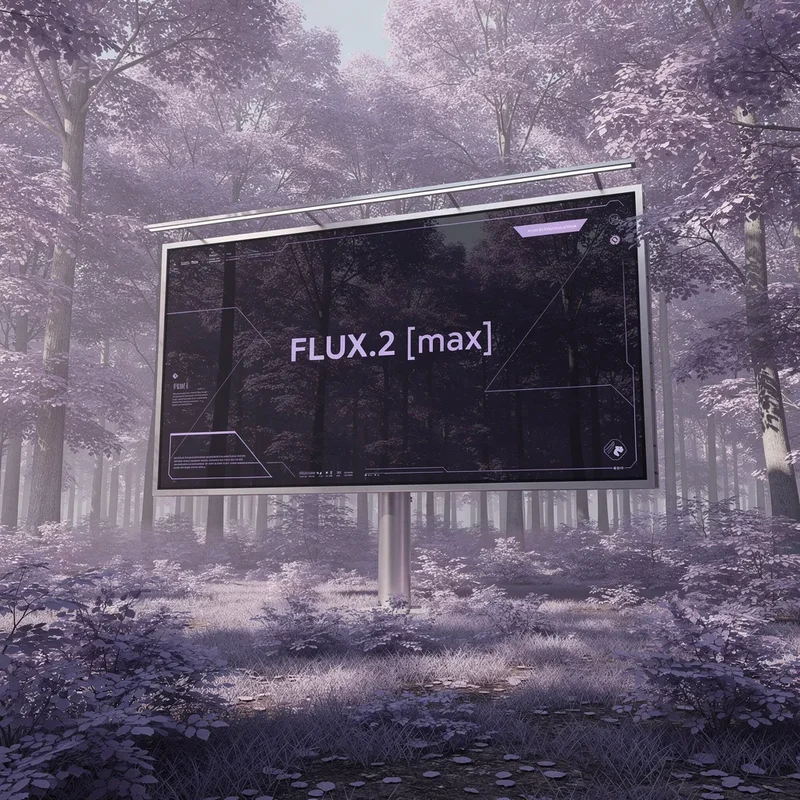
Aucune configuration requise · Entièrement personnalisable dans AI-Flow
Ce que fait cette application
FLUX.2 [max] est le modèle d’images haut de gamme de Black Forest Labs, conçu pour offrir la meilleure qualité d’image, un respect du prompt exceptionnel et une cohérence de premier plan entre personnages, produits, styles et arrière-plans. Il est pensé pour les workflows créatifs et de production exigeants, où justesse, finition et rapidité comptent.
Ce qu’il fait le mieux
Produire des images premium, photoréalistes ou stylisées, à partir de texte ou d’images de référence
Préserver l’identité et les détails fins sur des lots entiers et lors de retouches complexes
Suivre des prompts courts comme longs avec une précision de tout premier ordre
Générer des résultats variés mais fidèles au brief, pour l’exploration et l’idéation
Tourner presque aussi vite que FLUX.2 [pro], et jusqu’à 3× plus vite que des modèles comparables
Entrées et réglages
prompt (requis) — description en langage naturel de l’image souhaitée
input_images (optionnel, jusqu’à 8 via l’API) — une ou plusieurs références pour la génération image-vers-image et la cohérence multi-références
aspect_ratio — formats prédéfinis (1:1, 16:9, 4:5, etc.) ou match_input_image ; choisissez custom pour préciser largeur et hauteur
resolution — 0,5 à 4 MP (2 MP ou moins recommandé). La dimension maximale est de 2048×2048 ; les très hautes résolutions peuvent être rognées hors du format 1:1
width et height (mode custom uniquement) — doivent être des multiples de 32
safety_tolerance — 1 = le plus strict, 5 = le plus permissif
seed — à définir pour des rendus reproductibles
output_format — webp, jpg ou png
output_quality — 0 à 100 (réglage de qualité pour les formats autres que PNG)
Résultat - L’URL directe (uri) de l’image générée
Cas d’usage idéaux
E-commerce et marketing produit — photos prêtes pour un lancement, déclinaisons de couleurs précises (y compris par code hexadécimal), séries de visuels cohérentes
Cinéma, télévision et animation — images clés cinématographiques préservant personnages et émotions, pour de la pré-visualisation haut de gamme
Design créatif — arrière-plans, styles et compositions fidèles à la marque pour vos campagnes et contenus
Food, décoration et lifestyle — finition réaliste, qualité éditoriale, éclairage et colorimétrie constants
Idéation 3D et environnements — nouveaux points de vue à partir de références limitées, pour des scènes et des visites virtuelles
FLUX.2 [max], [pro] ou [flex] : quand choisir quoi
Choisissez FLUX.2 [max] pour une qualité maximale, un respect du prompt optimal et une cohérence multi-références
Choisissez FLUX.2 [pro] pour d’excellentes performances à grande échelle et une meilleure maîtrise du budget
Choisissez FLUX.2 [flex] lorsque votre tâche comporte beaucoup de texte ou exige une préservation parfaite des petits détails et de la typographie
Bonnes pratiques
Soyez explicite sur les sujets clés, l’angle de caméra, l’éclairage et l’ambiance
Fournissez jusqu’à 8 images de référence pour renforcer la cohérence d’une identité ou d’un produit
Commencez à 1 ou 2 MP pour équilibrer vitesse et qualité ; n’augmentez que si nécessaire
Utilisez seed pour reproduire vos résultats et itérer de façon prévisible
Utilisez match_input_image pour aligner le format en image-vers-image
Comment utiliser l’application
Voici ce que vous obtenez en ouvrant l’application : un formulaire court, un bouton d’exécution et vos résultats, sans nœuds ni configuration.
Flux 2 Max
Aperçu de l’applicationRemplissez le formulaire
Prompt
RequisSaisissez prompt…
Aspect Ratio
1:1
Input Images
Ajouter des images ou des fichiers
Resolution
1 MP
Seed
0
≈ 10 crédits / exécution
Récupérez votre résultat
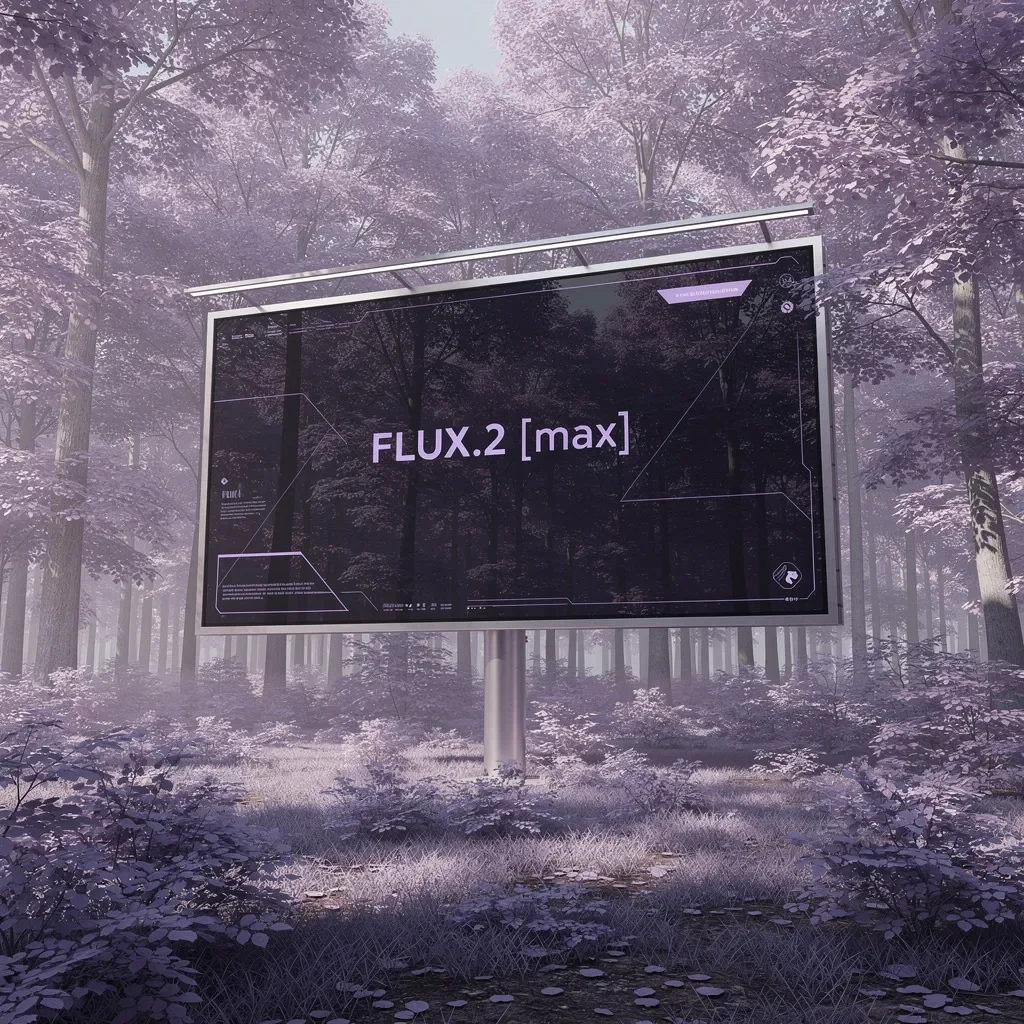
Résultat réel généré avec cette application
Sous le capot
Vous souhaitez plus de contrôle ?
Cette application repose sur un workflow AI-Flow entièrement modifiable. Changez le modèle, les prompts, la disposition ou la résolution, ou connectez-le à d’autres étapes.
Prompt
A photorealistic wide shot of a large minimalist digital billboard standing in the middle of a forest filled with purple and lavender-hued trees. Soft violet foliage surrounds the scene, creating a surreal yet elegant atmosphere. The billboard has a sleek m...
Image References
Références ou fichiers facultatifs.
Flux 2 Max
Comment utiliser ce template
Étape 1 : Saisissez votre texte dans le nœud « Prompt »
Renseignez le nœud « Prompt » avec le texte demandé.
A photorealistic wide shot of a large minimalist digital billboard standing in the middle of a forest filled with purple and lavender-hued trees. Soft violet foliage surrounds the scene, creating a surreal yet elegant atmosphere. The billboard has a sleek metal frame with subtle overhead lights, blending advanced technology with dreamlike nature. On the screen, a dark glass display shows a clean, futuristic UI with gentle lavender and magenta accents. The billboard is transparent, showing the trees behind it. Centered text reads: “FLUX.2 [max]” in a modern sans-serif font, calm, confident, and precise. Soft daylight with a purple color cast, cinematic composition, ultra-high resolution, premium AI launch aesthetic, minimalism, tranquil mood.
Étape 2 : Importez vos fichiers
Dans le nœud « Image References », importez les fichiers que vous souhaitez utiliser dans le workflow.
Étape 3 : Exécutez le workflow
Cliquez sur le bouton « Exécuter » pour lancer le workflow et obtenir le résultat final.
Personnalisez le workflow sous-jacent
Ouvrez le workflow complet dans l’éditeur AI-Flow pour changer de modèle, réécrire les prompts ou le connecter à d’autres étapes.
À qui s’adresse ce template ?
Idéal pour les professionnels et les créateurs qui souhaitent simplifier leur workflow
Équipes e-commerce et marketing produit
Créez des photos produit premium, des déclinaisons de couleurs et des séries publicitaires cohérentes, plus vite qu’avec un workflow photo traditionnel.
Studios de cinéma, d’animation et de pré-visualisation
Générez des images clés cinématographiques qui préservent l’identité, le style et l’émotion des personnages, pour un développement narratif haut de gamme.
Designers et directeurs artistiques
Explorez rapidement des styles, arrière-plans et compositions fidèles à la marque, avec une grande fidélité et une précision de prompt élevée.
Créateurs de contenu et agences
Produisez des visuels prêts pour la campagne, avec un respect du prompt supérieur, une retouche multi-références et une itération rapide.
Prêt à créer ?
Commencez à utiliser cette application
Aucune configuration requise — ouvrez l’application et commencez à créer en quelques minutes
Vous aimerez peut-être aussi
Explorez d’autres templates puissants pour enrichir votre workflow IA

Génération d’images avec GPT Image 2.5 Flare
Générez des images haute fidélité avec GPT Image 2.5 Flare, optimisé pour la typographie réaliste, les écritures multilingues, les mises en page structurées et les formats prêts à imprimer jusqu’en 4K, pour affiches, bandes dessinées, marketing, maquettes UI et réseaux sociaux.

Génération d’images avec GPT Image 2.5 Sunburst
Générez des images haute fidélité avec GPT Image 2.5 Sunburst, optimisé pour la typographie réaliste, les écritures multilingues, les mises en page structurées et les formats prêts à imprimer jusqu’en 4K, pour affiches, bandes dessinées, marketing, maquettes UI et réseaux sociaux.

Générateur IA de photos produit de soin
Transformez une seule image de crème, de sérum ou de pot cosmétique en shooting complet : une grille 2 × 2 et quatre visuels recadrés (plan large, plan moyen, gros plan, angle créatif), porté ou produit seul, pour l'e-commerce beauté, les marketplaces et la publicité.

Générateur IA de photos produit de crème solaire
Transformez une seule image de tube ou de flacon solaire en shooting complet : une grille 2 × 2 et quatre visuels recadrés (plan large, plan moyen, gros plan, angle créatif), porté ou produit seul, pour l'e-commerce beauté, les marketplaces et la publicité.

Générateur IA de mockups de t-shirts
Transformez une seule image de t-shirt en mockups print-on-demand portés : une grille 2 × 2 et quatre visuels recadrés (plan large, plan moyen, gros plan sur l'impression, angle créatif), pour Etsy, Shopify et vos boutiques POD.
Générateur IA de photos produit de sneakers
Générez des photos produit de sneakers à partir d'une seule image de chaussure : une grille 2 × 2 et quatre visuels recadrés (plan large, plan moyen, gros plan, angle créatif), en mode porté ou produit seul, pour vos fiches e-commerce, marketplaces et publicités.
Questions fréquentes
Qu’est-ce qui distingue FLUX.2 [max] de FLUX.2 [pro] et FLUX.2 [flex] ?
FLUX.2 [max] offre les performances maximales : la meilleure cohérence en retouche, le meilleur respect du prompt et une grande fidélité stylistique. Utilisez FLUX.2 [pro] pour d’excellentes performances à moindre coût à grande échelle. Utilisez FLUX.2 [flex] lorsque la typographie et les incrustations de texte fines sont déterminantes.
Prend-il en charge l’image-vers-image et la retouche multi-références ?
Oui. Fournissez jusqu’à 8 images de référence via l’API pour conserver identités, produits et styles d’un rendu à l’autre. Dans le Playground, jusqu’à 10 références sont prises en charge.
Comment choisir le format, la largeur, la hauteur et la résolution ?
Choisissez un aspect_ratio prédéfini (1:1, 16:9…) ou utilisez match_input_image. Pour un dimensionnement personnalisé, réglez width et height (multiples de 32). La résolution contrôle le nombre total de mégapixels (0,5 à 4 MP) ; 1 à 2 MP est recommandé pour équilibrer vitesse et qualité. La dimension maximale est de 2048×2048.
Quels formats de sortie sont disponibles ?
Vous pouvez exporter en webp, jpg ou png. Le réglage output_quality (0 à 100) s’applique au webp et au jpg ; le PNG ignore les réglages de qualité.
Comment garantir des personnages ou des produits cohérents sur toute une série ?
Utilisez plusieurs images de référence du même sujet, gardez les détails de votre prompt constants, et fixez une graine (seed) pour la reproductibilité lors de vos itérations.
FLUX.2 [max] est-il adapté à la génération de texte dans l’image ?
Il sait rendre du texte, mais si votre usage repose fortement sur le texte (typographie précise ou incrustations), FLUX.2 [flex] est optimisé pour ces scénarios.
Comment fonctionne le réglage safety_tolerance ?
safety_tolerance contrôle la sévérité du filtrage. 1 est le plus strict et 5 le plus permissif. Choisissez une valeur en fonction de votre contenu et de vos exigences de conformité.
Quelles sont les bonnes pratiques de prompt ?
Soyez explicite sur le sujet, le style, l’angle de caméra, l’éclairage, les matières et l’ambiance. Ajoutez des contraintes comme des couleurs de marque ou des codes hexadécimaux. Pour une retouche, téléversez des images de référence nettes et décrivez précisément les changements souhaités.
FLUX.2 [max] est-il rapide ?
Malgré sa qualité et sa cohérence supérieures, FLUX.2 [max] tourne presque aussi vite que FLUX.2 [pro] et peut être jusqu’à 3× plus rapide que des modèles concurrents de qualité comparable.
Quel est le nombre maximal d’images en entrée ?
Jusqu’à 8 images via l’API pour les workflows image-vers-image ou multi-références. Utilisez des références de bonne qualité et pertinentes pour obtenir la meilleure fidélité.
Qu’est-ce qu’AI-FLOW et comment peut-il m’aider ?
AI-FLOW est une plateforme d’IA tout-en-un qui vous permet de créer, d’intégrer et d’automatiser des workflows alimentés par l’IA grâce à une interface intuitive en glisser-déposer. Débutant ou expert, vous pouvez combiner plusieurs modèles d’IA pour créer des solutions innovantes sans écrire de code.
Un essai gratuit est-il disponible ?
Oui, AI-FLOW propose un essai gratuit pour commencer. Vous pouvez ensuite acheter des crédits selon vos besoins, sans abonnement ni engagement à long terme.
Puis-je intégrer mes clés API OpenAI, Replicate et d’autres fournisseurs dans la version Cloud d’AI-FLOW ?
Oui, vous pouvez facilement intégrer vos propres clés API à AI-FLOW. Les nœuds associés utiliseront alors votre clé, ce qui réduit considérablement votre consommation de crédits sur la plateforme.