
Workflow de création de publicité UGC — Du script à la vidéo
Créateur complet de publicités UGC qui transforme une photo du sujet, une photo du produit et un script facultatif en une première image prête à l’emploi, puis en une vidéo verticale de 8 s avec voix et mouvements naturels de caméra à main levée.
Aperçu du workflow
Fonctionnement du template Workflow de création de publicité UGC — Du script à la vidéo
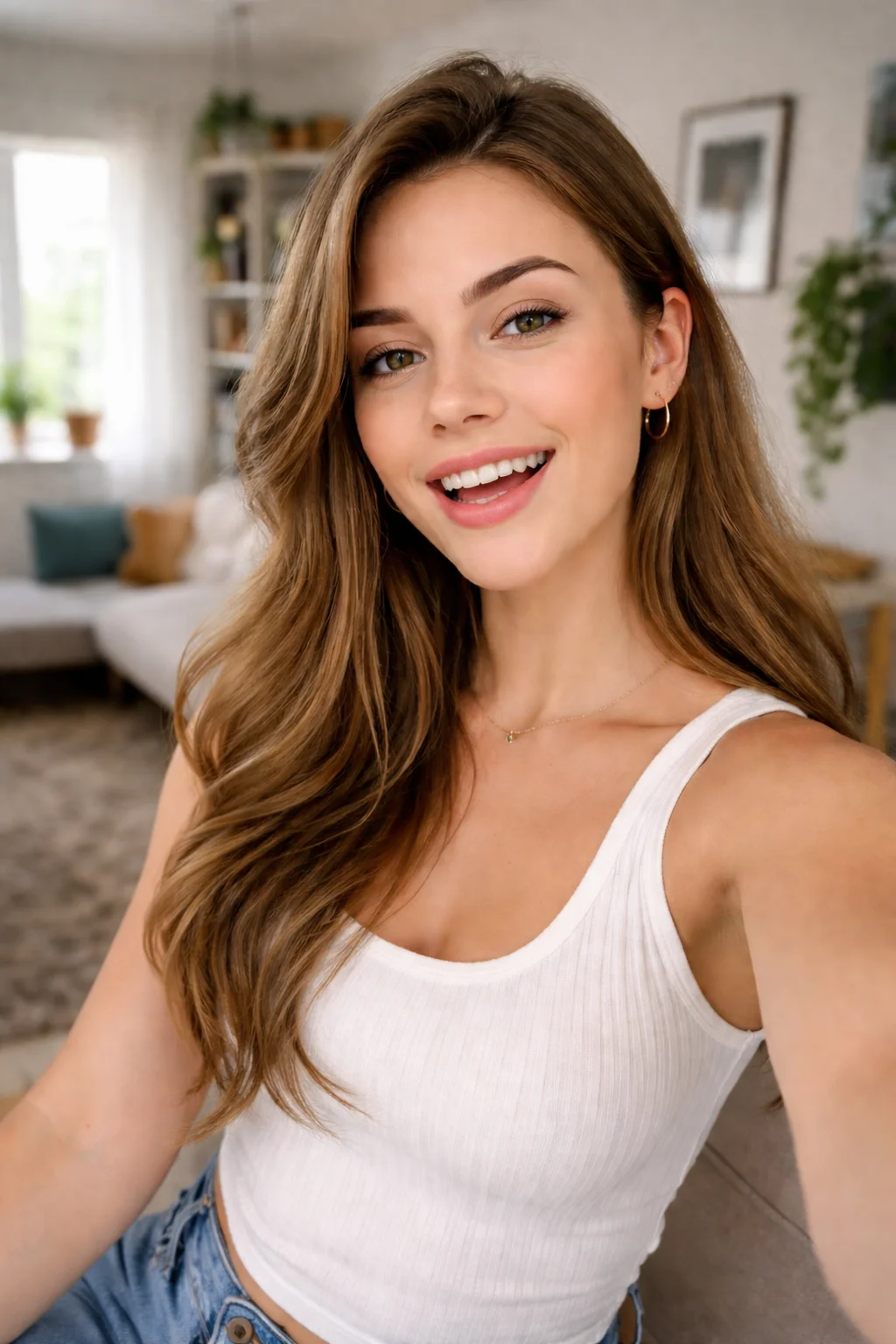
Subject
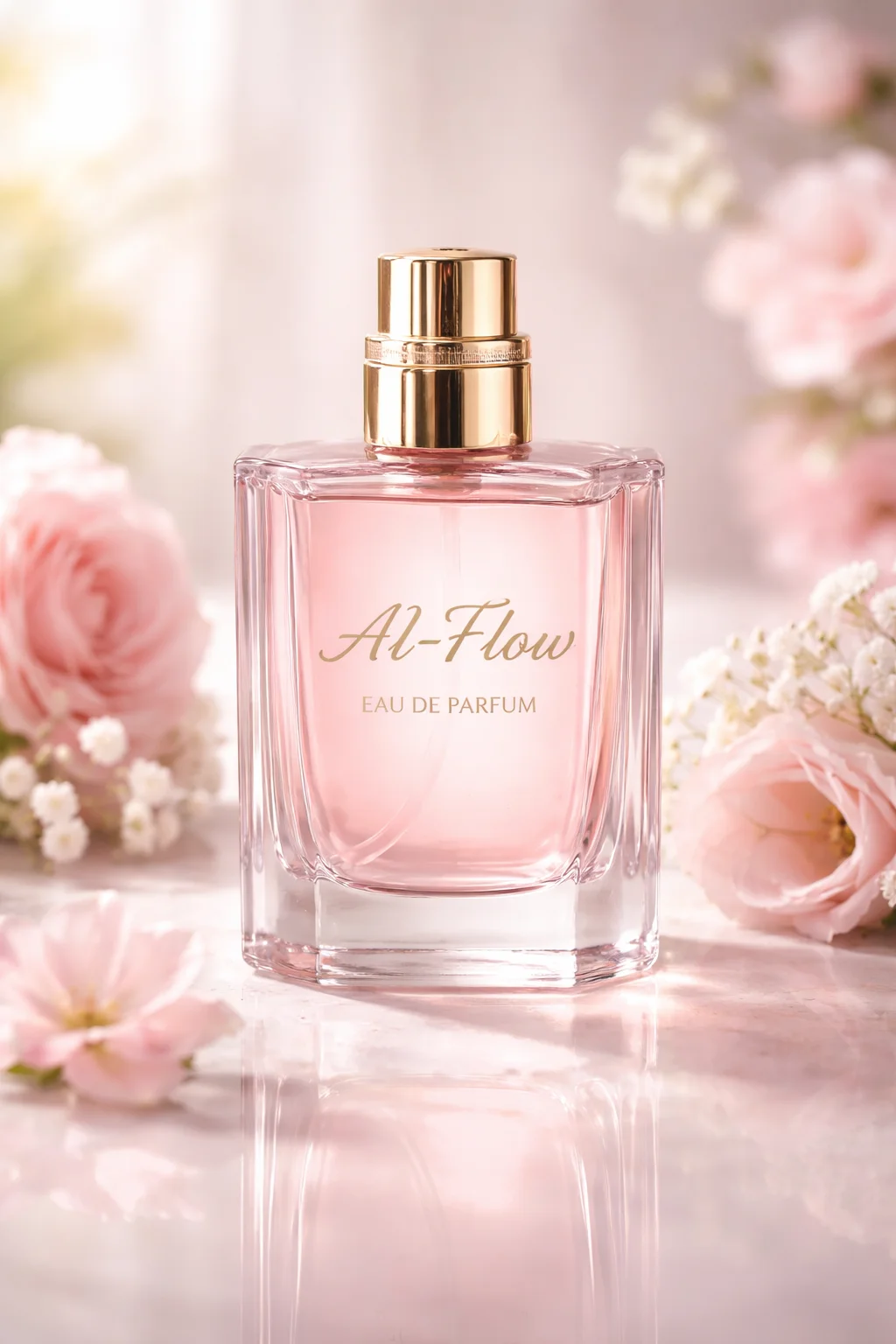
Product
Optionnal - Video Script
I’ve been wearing AI-Flow Eau de Parfum all week — it’s soft, a little sexy, and people keep asking what it is. Honestly, it feels like my new signature scent.
Video Script Prompt
To build you prompt, please check The ultimate prompting guide for Veo 3.1 made by google, and use it accordingly. Based on the image and the following script : I’ve been wearing AI-Flow Eau de Parfum all week — it’s soft, a little sexy, and people keep ask...
GPT
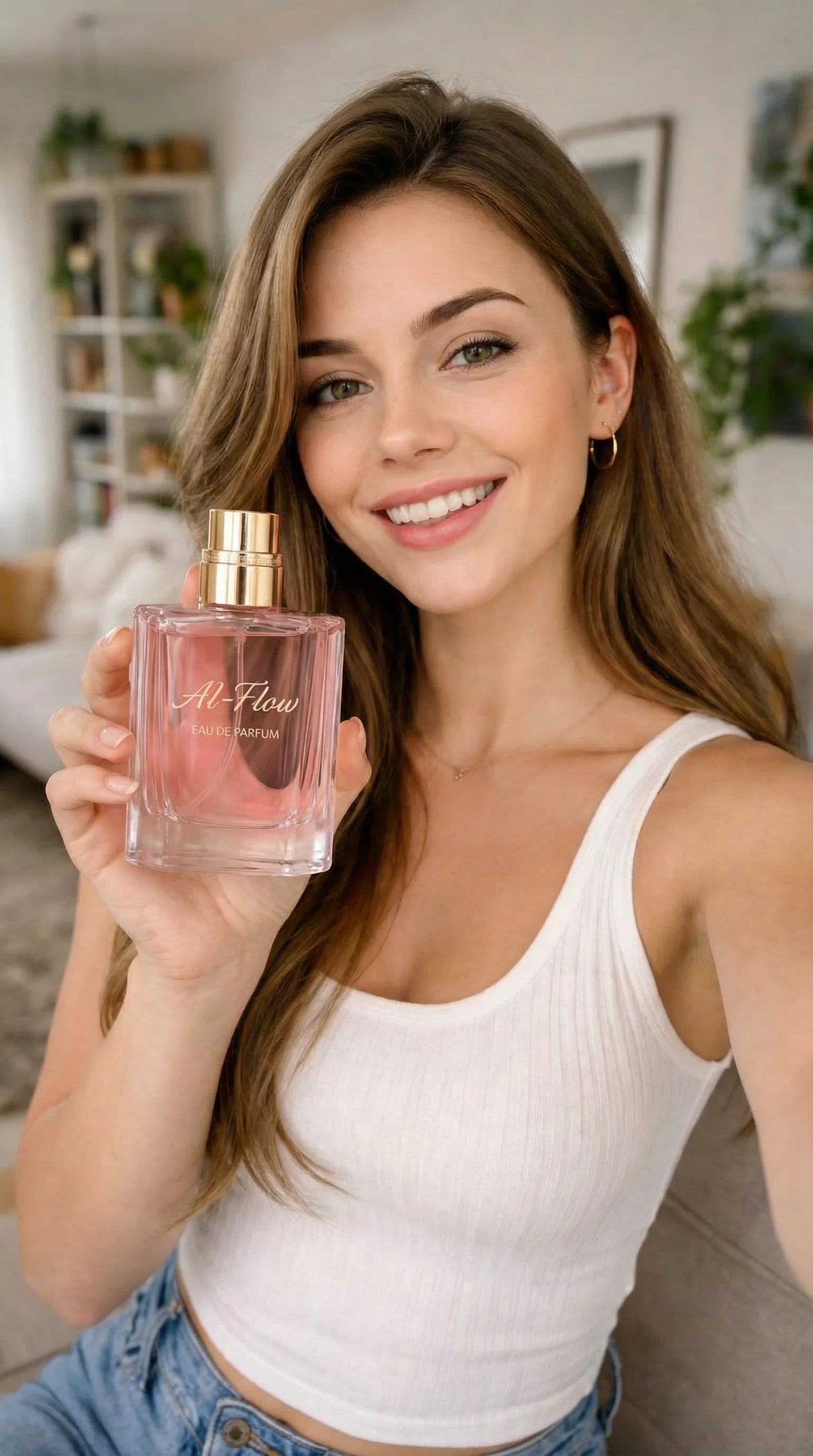
Vertical smartphone selfie, cozy sunlit living room. The woman sits on a couch, smiling warmly at the lens, casual white ribbed tank and light denim, subtle gold hoops, natural makeup. She presents the perfume bottle close to the camera with the cap on, lab...
Generate Image
Prompting Guide for Veo 3.1
Ultimate prompting guide for Veo 3.1 | Google Cloud Blog[Jump to Content](./#content)[Cloud](https://cloud.google.com/ "Google Cloud")[Blog](https://cloud.google.com/blog/ "Google Cloud Blog")[Contact sales](https://cloud.google.com/contact/) [Get started f...
GPT
[00:00-00:02] Selfie, handheld close-up with slight natural sway; shallow depth of field. A young woman in a white tank top smiles at camera in a bright, cozy living room with plants and shelves softly blurred. She holds a pink glass bottle labeled “AI-Flow...
Animate Image
À propos de ce template
Créez des publicités UGC authentiques et performantes en quelques minutes. Ce workflow part d’une image de sujet et d’une image de produit, génère une première image promotionnelle réaliste, et peut ensuite l’animer en une courte vidéo verticale, dialogues, ambiance sonore et léger mouvement de caméra compris.
Comment ça marche
Téléversez une image de sujet et une image de produit. Le système compose un prompt UGC épuré, centré sur le produit, et génère une première image verticale photoréaliste.
(Optionnel) Collez un court script. Le workflow construit un prompt d’animation horodaté avec dialogues, effets sonores, ambiance et prompts négatifs utiles, puis anime l’image fixe en une vidéo portrait de 8 s en 1080p.
Capacités clés
Un prompt image-vers-image qui préserve le sujet et le produit tout en adoptant un style UGC authentique.
Des visuels publicitaires verticaux 9 — 16 optimisés pour TikTok, Instagram Reels, YouTube Shorts et Snapchat.
Une interprétation vocale et un audio synchronisé pilotés par les répliques de votre script.
Un prompt horodaté pour un rythme précis — actions, indications de caméra, effets sonores et tempo.
Des images de référence optionnelles pour guider le rendu et la cohérence entre variantes.
Des modes qualité/vitesse ajustables et des indications de coût transparentes dans les nœuds.
Des sorties propres — l’URL de la première image et une vidéo MP4, prêtes pour vos tests médias.
Bonnes pratiques pour de bons résultats
Utilisez des images de sujet et de produit haute résolution et bien éclairées ; gardez les étiquettes face caméra.
Gardez la première image simple — pas d’incrustations ni de filtres marqués ; privilégiez la lisibilité du produit.
Rédigez un script concis d’une à deux phrases pour orienter le ton, l’émotion et les moments d’accroche.
Appuyez-vous sur les prompts négatifs pour éviter l’encombrement, les logos ou les artefacts de texte dans le cadre.
Comment utiliser ce template
Étape 1 : Upload the subject image
This node is where you upload the image of the person who will appear in the ad. Choose a clear, well-lit image to help the model generate a realistic first-frame.
Étape 2 : Upload the product image
This node is where you upload the product image that will be featured in the ad. Make sure to use a high-quality image with the product label clearly visible to ensure the best results.
Étape 3 : Script Input (Optional)
This node allows you to input a short script (one to two sentences) that will guide the video’s dialogue and timing. If you don't provide a script, the video will be generated without specific dialogue cues.
I’ve been wearing AI-Flow Eau de Parfum all week — it’s soft, a little sexy, and people keep asking what it is. Honestly, it feels like my new signature scent.
Étape 4 : Fetching Veo 3.1 Prompting Guide for Context purpose
Here, we are fetching the Veo 3.1 Prompting Guide to provide context for the LLM. The guide helps the model understand how to generate effective video prompts based on user scripts.
The output is the content fetched from https://cloud.google.com/blog/products/ai-machine-learning/ultimate-prompting-guide-for-veo-3-1?hl=en, that we will not display here for brevity.
Étape 5 : Run the Flow
Once you run the flow, the system will process the inputs through the defined nodes, ultimately producing a first-frame image and an 8-second vertical video based on your provided subject and product images, along with any script you may have included. Feel free to customize the nodes further or adjust parameters as needed to better fit your specific use case or creative vision.
À qui s’adresse ce template ?
Idéal pour les professionnels et les créateurs qui souhaitent simplifier leur workflow
Marketeurs DTC et e-commerce
Produisez rapidement des créations UGC centrées sur le produit pour vos boutiques, votre social paid et vos tests de landing pages, sans organiser de tournage.
Performance marketers et responsables acquisition
Générez des accroches verticales, des premières images et des variantes de 6 à 10 s pour accélérer vos tests créatifs sur TikTok, Reels et Shorts.
Créateurs de contenu et community managers
Transformez de simples selfies et photos produit en publications et promos UGC fidèles à votre marque, avec des mouvements et des voix réalistes.
Stratèges créatifs et studios UGC
Prototypez des concepts publicitaires, itérez sur les scripts et maintenez un style cohérent entre campagnes grâce aux images de référence et aux prompts horodatés.
Fondateurs et petites entreprises
Lancez des publicités UGC crédibles sans gros budget, en partant de vos photos produit existantes et d’un bref script.
Prêt à construire ?
Commencez à utiliser ce template
Ouvrez-le directement dans AI-Flow et commencez à créer en quelques minutes
Vous aimerez peut-être aussi
Explorez d’autres templates puissants pour enrichir votre workflow IA
Génération vidéo avec Gemini Omni 1.1 Flash
Créez des vidéos IA cinématographiques à partir de texte, d’images ou de séquences existantes avec Gemini Omni 1.1 Flash : texte-vers-vidéo, image-vers-vidéo et vidéo-vers-vidéo multimodaux, avec conception sonore native et mouvements réalistes cohérents.
MiniMax H3 - Références vers vidéo
Générez des vidéos 2K à partir de références multimodales avec MiniMax H3. Guidez le sujet, le style, le mouvement et l’audio avec jusqu’à 9 images, 3 clips vidéo et 3 clips audio, cités par leur ordre dans votre prompt.
MiniMax H3 - De la première à la dernière image
Animez une première image en une vidéo 2K cohérente (5 à 15 s) avec MiniMax H3 : image de fin facultative, mouvement dirigé par le prompt et audio stéréo natif.
Génération vidéo avec Seedance 2.5
Générez avec le modèle multimodal Seedance-2.5 de ByteDance des vidéos de haute qualité avec audio synchronisé, jusqu’à 30 secondes, à partir de texte, d’images, de clips vidéo et d’audio.
Génération vidéo avec Gemini Omni Flash
Créez des vidéos IA cinématographiques à partir de texte, d’images ou de séquences existantes avec Gemini Omni Flash : texte-vers-vidéo, image-vers-vidéo et vidéo-vers-vidéo multimodaux, avec conception sonore native et mouvements réalistes cohérents.
Génération vidéo avec Seedance 2.0 mini
Génération texte-vers-vidéo et image-vers-vidéo économique pour les gros volumes, avec références multimodales et audio natif synchronisé jusqu’en 720p.
Questions fréquentes
Que produit ce workflow ?
Une première image UGC réaliste à partir de vos photos de sujet et de produit, ainsi qu’une vidéo verticale optionnelle de 8 secondes avec dialogues, effets sonores et mouvement caméra à main levée. Les deux sont pensées pour être directement exploitables en publicité.
De quelles entrées ai-je besoin ?
Une image de sujet (la personne) et une image de produit. En option, un court script (une à deux phrases) pour piloter les dialogues et le rythme de la vidéo.
Puis-je l’utiliser uniquement pour des publicités en image ?
Oui. Vous pouvez vous arrêter après la génération de la première image si vous n’avez pas besoin de vidéo. La branche vidéo est facultative.
Comment le script influence-t-il la vidéo ?
Votre script est converti en un prompt d’animation horodaté, avec dialogues, indications de caméra et repères audio. Le modèle anime ensuite la première image pour coller aux répliques et au timing.
Y a-t-il une voix et du son ?
Oui. La branche vidéo génère une voix et une ambiance sonore synchronisées à partir des dialogues et des repères d’effets sonores présents dans le prompt.
Quels formats et spécifications sont pris en charge ?
Le workflow vise une vidéo verticale 9:16 en 1080p d’environ 8 secondes et produit une première image de haute qualité adaptée aux emplacements mobiles. Vous pouvez l’adapter au 16:9 ou au format carré selon vos besoins.
Puis-je guider le style ou garder des personnages cohérents ?
Oui. Utilisez vos images de sujet et de produit comme références, et ajoutez si besoin des images de référence supplémentaires pour orienter le style, l’arrière-plan ou la cohérence de marque.
Comment obtenir de meilleurs résultats ?
Utilisez des photos nettes et haute résolution avec un bon éclairage ; veillez à ce que l’étiquette du produit soit face caméra ; gardez le script concis ; ajoutez des prompts négatifs pour éviter le texte, les filtres marqués ou les objets superflus.
Qu’en est-il du coût et de la vitesse ?
Vous pouvez basculer entre des modes qualité et vitesse. L’interface affiche un prix indicatif par image ou par seconde de vidéo, afin de choisir entre des aperçus rapides et des rendus de meilleure qualité.
Ai-je besoin d’une autorisation pour utiliser les images d’entrée ?
Oui. Ne téléversez que des images dont vous détenez les droits d’usage. Vous êtes propriétaire des rendus selon les conditions de la plateforme, mais vous restez responsable du contenu fourni et des allégations produit.
Qu’est-ce qu’AI-FLOW et comment peut-il m’aider ?
AI-FLOW est une plateforme d’IA tout-en-un qui vous permet de créer, d’intégrer et d’automatiser des workflows alimentés par l’IA grâce à une interface intuitive en glisser-déposer. Débutant ou expert, vous pouvez combiner plusieurs modèles d’IA pour créer des solutions innovantes sans écrire de code.
Un essai gratuit est-il disponible ?
Oui, AI-FLOW propose un essai gratuit pour commencer. Vous pouvez ensuite acheter des crédits selon vos besoins, sans abonnement ni engagement à long terme.
Puis-je intégrer mes clés API OpenAI, Replicate et d’autres fournisseurs dans la version Cloud d’AI-FLOW ?
Oui, vous pouvez facilement intégrer vos propres clés API à AI-FLOW. Les nœuds associés utiliseront alors votre clé, ce qui réduit considérablement votre consommation de crédits sur la plateforme.