
3-Shot Product Reveal Video
Create a polished product reveal video from product, environment, and logo references. The workflow generates four keyframes, animates three transitions, and merges them into a cinematic ad.
About This Template
3-Shot Product Reveal Video turns a simple product concept into a short cinematic reveal built from four keyframes and three controlled transitions. Instead of asking a video model to invent the whole ad in one pass, the workflow creates a clear setup, reveal, detail, and hero moment, then animates each transition with first-frame and last-frame guidance. How it works: 1. Write or edit the storyboard prompt for the product reveal. 2. Generate a 2x2 keyframe grid. 3. Split the grid into four frames. 4. Use three transition prompts to animate setup to reveal, reveal to detail, and detail to final hero. 5. Merge the generated clips into one polished short video. Best for product launches, ecommerce ads, brand teasers, tech products, luxury objects, packaging reveals, watches, beauty products, beverages, sneakers, and app/device announcements. Recommended use: start at 720p with short 4-second transitions, approve the visual direction, then duplicate or upgrade the flow for longer or higher-resolution renders. Workflow difference: this version is reference-driven. Add product, background, packaging, or logo images in the Product / Brand References node, then use the keyframe prompt to explain how those references should appear across setup, reveal, detail, and final hero frames.
Template Workflow
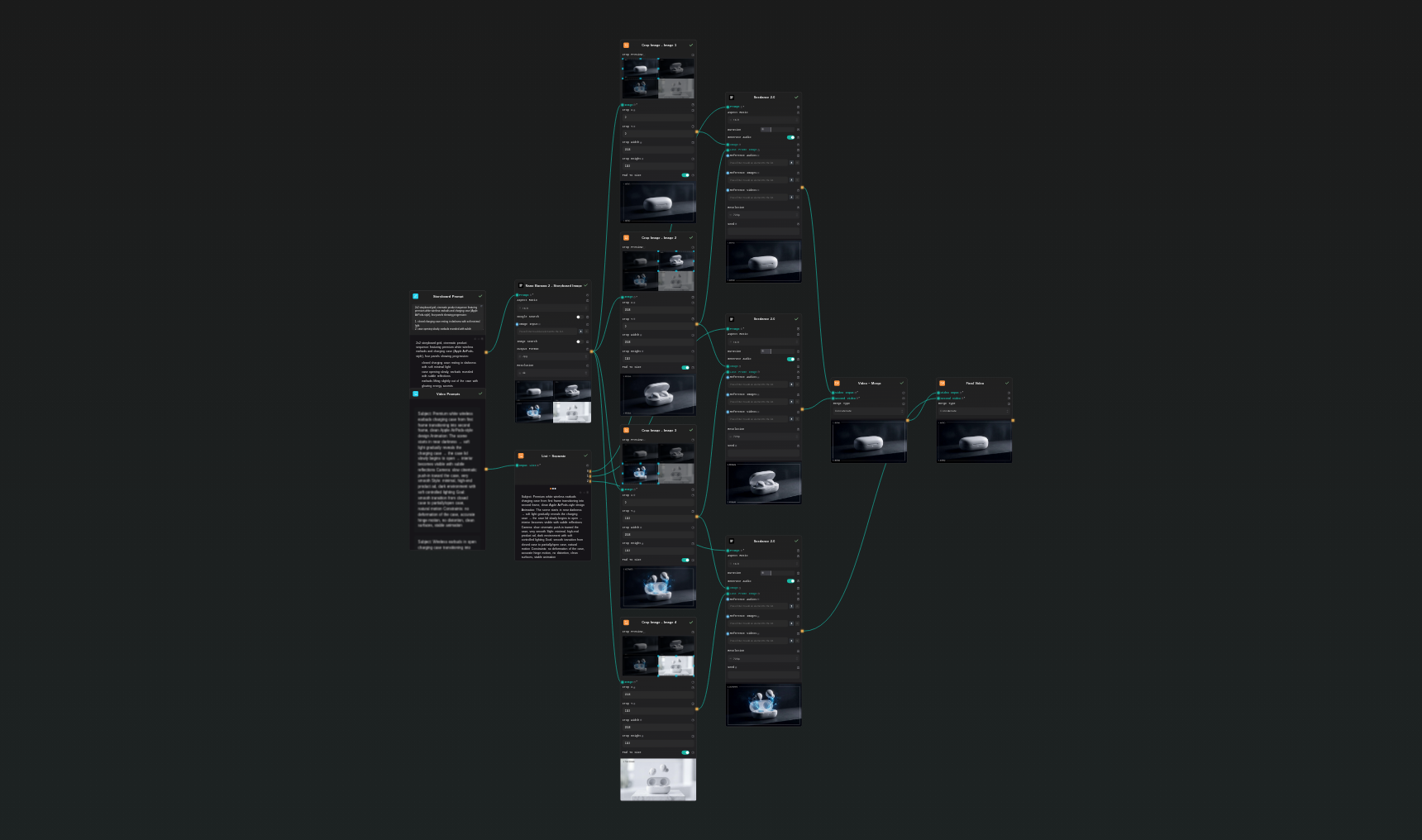
How to Use This Template
Step 1: Enter your text in 'Reveal Direction' Node
Fill the 'Reveal Direction' node with the required text.
2x2 storyboard grid, cinematic product reveal sequence for a luxury black smartwatch with a polished metal case and glowing display, four panels showing progression:

1. the smartwatch hidden in darkness on a matte black surface, only a thin rim light visible
2. a narrow beam of light sweeps across the watch, revealing the curved glass and metal edge
3. macro close-up of the display activating with clean UI reflections and premium highlights
4. final hero shot, smartwatch floating upright with subtle glow, logo-safe empty space behind it

consistent product shape across all panels, premium tech commercial, controlled reflections, cinematic black background, clean composition, no warped watch geometry
Step 2: Upload your files
In the 'Product / Brand References' node, upload the files you want to use in the workflow.
Step 3: Run the Flow
Click the 'Run' button to execute the flow and get the final output.
Who is this for?
Perfect for professionals and creators looking to streamline their workflow
eCommerce brands
Create premium reveal videos for product pages, ads, and launch campaigns.
Performance marketers
Build short creative variants with clear beginning, reveal, and hero payoff.
Creative directors
Turn product ad concepts into controllable keyframe-based motion tests.
Founders and makers
Produce a polished launch teaser without a full video production setup.
Ready to build?
Start using this template
Open it directly in AI-Flow and start creating in minutes
You Might Also Like
Explore other powerful templates to enhance your AI workflow
Kling V2.6
Kling V2.6 is a pro-grade AI video generator that turns text or a single image into cinematic 1080p clips with fluid motion and native, synchronized audio (dialogue, ambience, and effects).
UGC Ad Creation Workflow – From Script to Video
End-to-end UGC ad builder that turns a subject photo, a product photo, and an optional script into a ready-to-run first-frame image and an 8s vertical video with voice and natural handheld motion.
Generate realistic lipsync animations from audio
Generate realistic lip‑sync animations from any audio track. PixVerse Lipsync aligns mouth movements to the speech with natural timing and expressions.
Kling V2.5 Turbo Pro
Kling 2.5 Turbo Pro: Unlock pro-level text-to-video and image-to-video creation with smooth motion, cinematic depth, and remarkable prompt adherence.
Sora 2
Latest version of Sora, with higher-fidelity video, context-aware audio, reference image support
Veo 3.1
New and improved version of Veo 3, with higher-fidelity video, context-aware audio, reference image and last frame support
Frequently Asked Questions
What does this template create?
It creates a three-transition product reveal video from four generated keyframes: setup, reveal, detail, and hero shot.
Why use keyframes?
Keyframes keep the product composition more stable and make the video easier to direct than a single long prompt.
Can I replace the example product?
Yes. Edit the storyboard prompt and the three transition prompts to describe your product, setting, and desired final hero moment.
What is the expected cost?
The default flow uses one storyboard image plus three short Seedance video generations. A typical 720p run is roughly in the 160-260 credit range depending on settings.
How do I get better product accuracy?
Keep the four keyframes visually consistent, use clean backgrounds, and add explicit constraints such as no deformation, preserve logo, and stable product geometry.
What is AI-FLOW and how can it help me?
AI-FLOW is an all-in-one AI platform that allows you to build, integrate, and automate AI-powered workflows using an intuitive drag-and-drop interface. Whether you're a beginner or an expert, you can leverage multiple AI models to create innovative solutions without any coding required.
Is there a free trial available?
Yes, AI-FLOW offers a free trial to get you started. After that, you can purchase credits as needed—no subscription or long-term commitment required.
Can I integrate my API keys from providers like OpenAI and Replicate with AI-FLOW Cloud Version ?
Yes, you can easily integrate your existing API keys with AI-FLOW. If specified, nodes related to the API Key provided will use your API key, significantly reducing your platform credit usage.