
Animer une image avec Seedance 2.0
Animez n’importe quelle image fixe en vidéo cinématographique avec Seedance 2.0 : mouvements fluides, caméra dynamique et audio IA facultatif, tout en préservant le style et la composition d’origine.
Aperçu du workflow
Fonctionnement du template Animer une image avec Seedance 2.0
First frame
Prompt
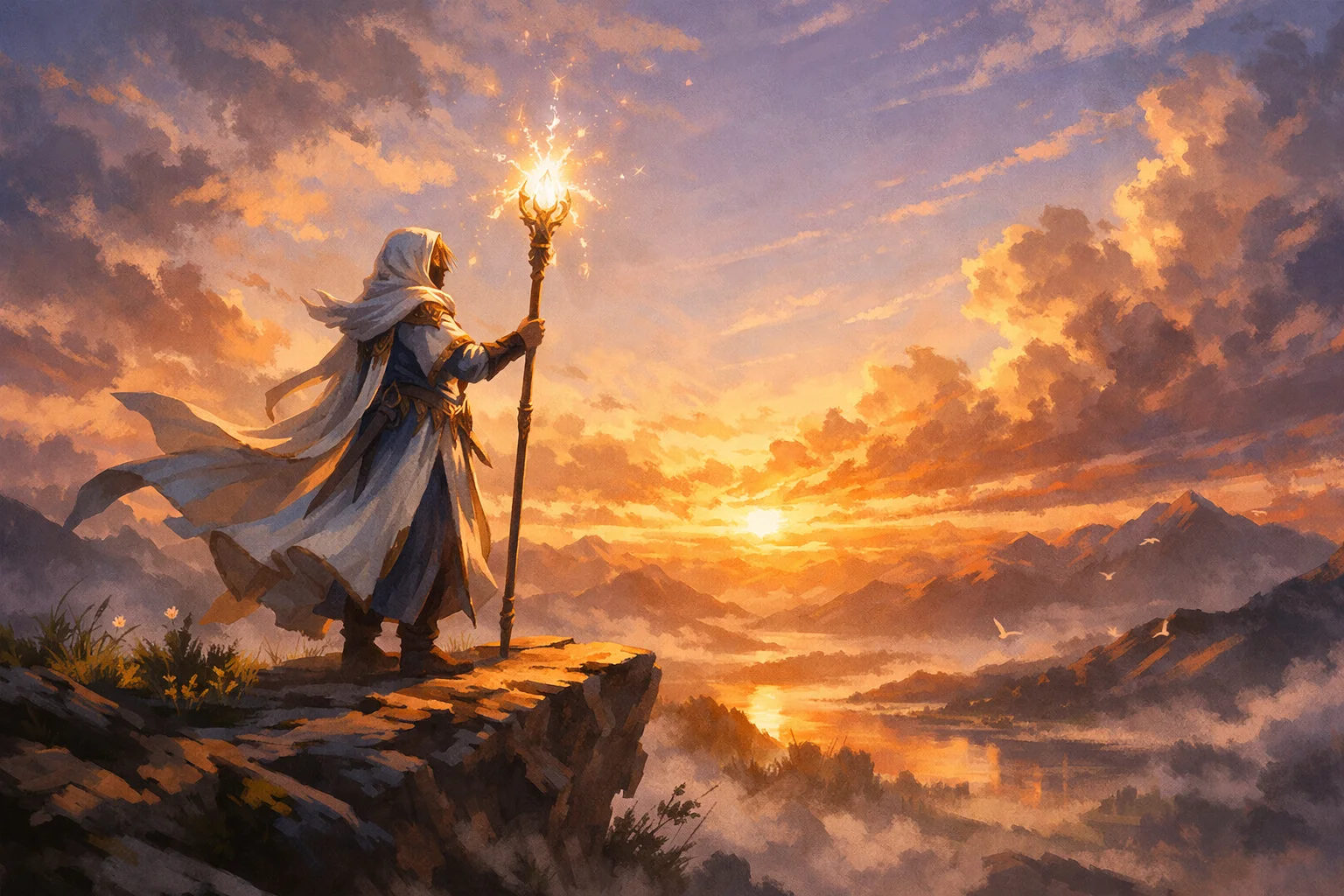
Subject (from image): Stylized fantasy mage standing on a cliff, glowing staff, painterly illustration style Animation: The scene starts still → wind begins to move the mage’s robes and hair → glowing particles appear around the staff → the mage lifts the s...
Seedance 2.0
À propos de ce template
Turn a single image into a polished short video with Seedance 2.0. This image-to-video template adds natural motion, parallax, and cinematic camera moves while keeping the original look and layout intact—ideal for painterly illustrations, stylized art, product stills, and key visuals.
Key capabilities
Image-to-video from a first frame, with optional last frame to control the ending
Prompt-driven animation beats, particles, light effects, and camera moves (push-in, tilt, pan)
Optional AI audio generation with dialogue (use double quotes), sound effects, and background music
Supports aspect ratios like 16 — 9, 9:16, 1:1, and more; outputs at 480p or 720p
Reference media for consistency — audio (up to 3, 15s total), images (up to 9), videos (up to 3, 15s total)
Seed control for reproducible results
Best-practice prompt structure (copy/paste and adapt): Subject (from image): describe the key subject and style Animation: outline the motion beats using arrows (→) for timing Camera: define push-in/out, tilt, pan, or arc moves Style Preservation: specify “keep original style, colors, and composition” Key Moment: highlight a climax or reveal Constraints: add guardrails like “no distortion, no redesign, stable motion”
Perfect for social teasers, hero banners, concept tests, reels/shorts, and motion-first storytelling where you need high prompt adherence without redesigning your source art.
Comment utiliser ce template
Étape 1 : Importez votre fichier
Dans le nœud « First frame », importez le fichier que vous souhaitez traiter.
Étape 2 : Saisissez votre texte dans le nœud « Prompt »
Renseignez le nœud « Prompt » avec le texte demandé.
Subject (from image):
Stylized fantasy mage standing on a cliff, glowing staff, painterly illustration style

Animation:
The scene starts still → wind begins to move the mage’s robes and hair → glowing particles appear around the staff → the mage lifts the staff and releases a beam of light into the sky

Camera:
Slow cinematic push-in toward the character, slight upward tilt following the beam

Style Preservation:
keep original painterly illustration style, same colors and composition, no photorealism

Key Moment:
The beam expands into a glowing magical burst in the sky, lighting up the entire scene

Constraints:
no distortion, no redesign, no extra limbs, stable motion, smooth animation
Étape 3 : Exécutez le workflow
Cliquez sur le bouton « Exécuter » pour lancer le workflow et obtenir le résultat final.
À qui s’adresse ce template ?
Idéal pour les professionnels et les créateurs qui souhaitent simplifier leur workflow
Illustrators and concept artists
Bring static artwork to life with subtle motion, particles, and light blooms while preserving your painterly or stylized look.
Motion designers and video editors
Create fast image-to-video shots with cinematic push-ins, parallax, and controlled beats for trailers, reels, and openers.
Marketing and social media teams
Transform product stills and campaign key visuals into scroll-stopping videos for TikTok, Reels, Shorts, and ads.
Game, film, and VFX teams
Previsualize scenes, enhance keyframes, and iterate on story beats without full 3D or hand-animated passes.
Content creators and streamers
Turn thumbnails and channel art into animated bumpers with optional AI voice lines, SFX, and background music.
Product and growth teams
Prototype animated hero sections, feature reveals, and app previews directly from static mocks.
Prêt à construire ?
Commencez à utiliser ce template
Ouvrez-le directement dans AI-Flow et commencez à créer en quelques minutes
Vous aimerez peut-être aussi
Explorez d’autres templates puissants pour enrichir votre workflow IA
Génération vidéo avec Kling V2.6
Kling V2.6 est un générateur vidéo IA professionnel qui transforme du texte ou une image en clips cinématographiques 1080p aux mouvements fluides, avec audio natif synchronisé : dialogues, ambiance et effets.
Workflow de création de publicité UGC — Du script à la vidéo
Créateur complet de publicités UGC qui transforme une photo du sujet, une photo du produit et un script facultatif en une première image prête à l’emploi, puis en une vidéo verticale de 8 s avec voix et mouvements naturels de caméra à main levée.
Générer des animations réalistes de synchronisation labiale à partir d’un audio
Générez des animations réalistes de synchronisation labiale à partir de n’importe quelle piste audio. PixVerse Lipsync aligne naturellement les mouvements de la bouche, le rythme de la parole et les expressions.
Génération vidéo avec Kling V2.5 Turbo Pro
Kling 2.5 Turbo Pro permet de créer des vidéos de niveau professionnel à partir de texte ou d’images, avec des mouvements fluides, une profondeur cinématographique et un excellent respect du prompt.
Sora 2
Latest version of Sora, with higher-fidelity video, context-aware audio, reference image support
Génération vidéo avec Veo 3.1
Nouvelle version améliorée de Veo 3, avec une vidéo plus fidèle, un audio sensible au contexte et la prise en charge d’une image de référence et de la dernière image.
Questions fréquentes
What does Animate Image with Seedance 2.0 do?
It converts a single still image into a short video with smooth subject motion, particle/light effects, and cinematic camera moves, optionally generating synchronized audio (dialogue, SFX, music) from your prompt.
Will it preserve my original art style and composition?
Yes. Include clear instructions like “keep original painterly style, same colors and composition, no photorealism.” Also add constraints such as “no distortion, no redesign, stable motion” to minimize drift.
Which inputs are supported?
Use a first frame image for image-to-video. Optionally add a last frame image to control the final shot. You can also provide reference media: up to 3 audio files (max 15s total), up to 9 images, or up to 3 videos (max 15s total). Note: first/last frame images cannot be combined with reference images.
How do I add dialogue, SFX, or music?
Enable audio generation and write dialogue in double quotes inside your prompt. You can also upload reference audio files and reference them as [Audio1], [Audio2], etc., to guide voice tone, rhythm, or background ambiance.
Can it lip-sync to a voice track?
Yes. Provide a reference audio clip and reference it in your prompt (e.g., “match lip-sync to [Audio1]”). Dialogue in quotes also helps the model align mouth movements.
Can I use a last frame to control the ending?
Yes. Supply a last_frame_image alongside the first frame. This guides the final composition and helps the animation land on a specific pose or layout.
What are the duration, aspect ratios, and resolution options?
Duration: set 1–15 seconds or use -1 for intelligent length. Aspect ratios: 16:9, 9:16, 1:1, 4:3, 3:4, 21:9, or adaptive. Resolution: 480p or 720p.
How do I write a strong prompt for animation?
Structure it into sections: Subject (from image), Animation beats using arrows (→), Camera moves, Style Preservation, Key Moment, and Constraints. Keep camera and motion moderate for single-image inputs to avoid artifacts.
Can I combine a first frame with reference images or videos?
No. First/last frame images cannot be used together with reference images. You can, however, use audio references with a first frame. If you need style/character guidance via reference images, skip the first/last frame mode.
How do I improve stability and reduce distortions?
Add constraints like “no distortion, no redesign, stable motion, smooth animation,” align aspect ratio with your source image, avoid extreme camera moves, keep durations concise, and set a seed for consistency across runs.
Is the output reproducible?
Yes. Set a random seed to make results more consistent when re-running with the same inputs and prompt.
What affects cost and speed?
Duration, resolution (720p > 480p), and input type (video-in vs non-video-in) impact compute usage. Shorter clips and lower resolution render faster and cost less.
Can I make vertical videos for TikTok/Reels?
Yes. Choose 9:16, center the subject in your source image, and describe vertical-friendly camera moves (e.g., slight upward tilt or push-in).
Any usage tips for best visual quality?
Start with a high-quality, uncluttered first frame; match aspect ratio to your target platform; keep motion beats readable; and include a clear Key Moment to guide the climax of the animation.
Qu’est-ce qu’AI-FLOW et comment peut-il m’aider ?
AI-FLOW est une plateforme d’IA tout-en-un qui vous permet de créer, d’intégrer et d’automatiser des workflows alimentés par l’IA grâce à une interface intuitive en glisser-déposer. Débutant ou expert, vous pouvez combiner plusieurs modèles d’IA pour créer des solutions innovantes sans écrire de code.
Un essai gratuit est-il disponible ?
Oui, AI-FLOW propose un essai gratuit pour commencer. Vous pouvez ensuite acheter des crédits selon vos besoins, sans abonnement ni engagement à long terme.
Puis-je intégrer mes clés API OpenAI, Replicate et d’autres fournisseurs dans la version Cloud d’AI-FLOW ?
Oui, vous pouvez facilement intégrer vos propres clés API à AI-FLOW. Les nœuds associés utiliseront alors votre clé, ce qui réduit considérablement votre consommation de crédits sur la plateforme.