
Génération d’images avec GPT Image 2
Générez des images haute fidélité avec GPT Image 2, optimisé pour la typographie réaliste, les écritures multilingues, les mises en page structurées et les formats prêts à imprimer jusqu’en 4K, pour affiches, bandes dessinées, marketing, maquettes UI et réseaux sociaux.
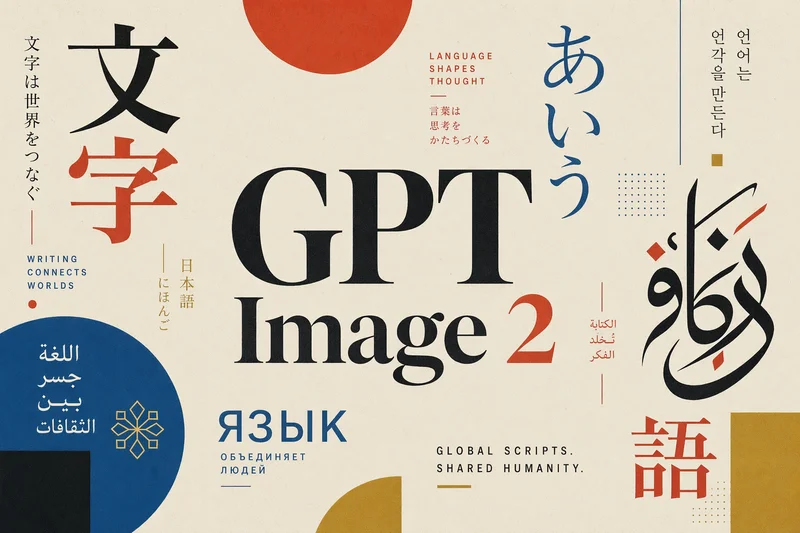
Aucune configuration requise · Entièrement personnalisable dans AI-Flow
Ce que fait cette application
GPT Image 2 marque un saut qualitatif dans la génération texte-vers-image : il est conçu pour produire des images plus structurées, plus cohérentes et plus fidèles à des prompts complexes. Il excelle en typographie avancée, en continuité de scène et en raisonnement de mise en page, ce qui permet aux équipes créatives de passer du concept à des visuels exploitables avec bien moins de post-production.
La typographie est son point fort : le modèle restitue avec une grande précision les petits textes, les éléments d’interface denses, les pictogrammes et les contraintes typographiques subtiles. Il gère les mélanges de styles (serif, sans serif, calligraphique) avec une hiérarchie claire, un crénage serré et un alignement propre — ce qui ouvre la porte aux affiches, infographies, maquettes d’interface, doubles pages éditoriales et compositions de marque, longtemps limitées par le texte illisible des IA.
Les capacités multilingues sont nettement améliorées, avec de très bons résultats sur les écritures non latines : japonais, coréen (hangul), chinois, hindi et bengali. C’est donc une option puissante pour les campagnes internationales, la publicité localisée, les affiches multilingues et les formats BD (manga, manhwa) qui exigent justesse et constance de l’écriture.
Les formats disponibles vont de l’ultra-large 3:1 à l’ultra-haut 1:3, couvrant bannières web, diapositives, affiches, écrans mobiles et formats sociaux. Avec des rendus haute résolution et des options jusqu’au 4K dans ce template, vous produisez des visuels nets, équilibrés et proches du prêt-à-imprimer — ce qui réduit les recadrages et les corrections manuelles.
Utilisez GPT Image 2 lorsque vous avez besoin de : design d’affiche de qualité éditoriale, supports de marque multilingues, mises en page structurées avec des grilles fortes, blancs maîtrisés, typographie précise et respect fiable d’une direction artistique complexe. Il ne remplace pas la retouche au pixel près ni la correspondance exacte des polices, mais il accélère considérablement l’itération créative et la production de visuels.
Comment utiliser l’application
Voici ce que vous obtenez en ouvrant l’application : un formulaire court, un bouton d’exécution et vos résultats, sans nœuds ni configuration.
GPT Image 2
Aperçu de l’applicationRemplissez le formulaire
Prompt
RequisSaisissez prompt…
Size
Requisauto
Quality
Requisauto
≈ 17–30 crédits / exécution
Récupérez votre résultat
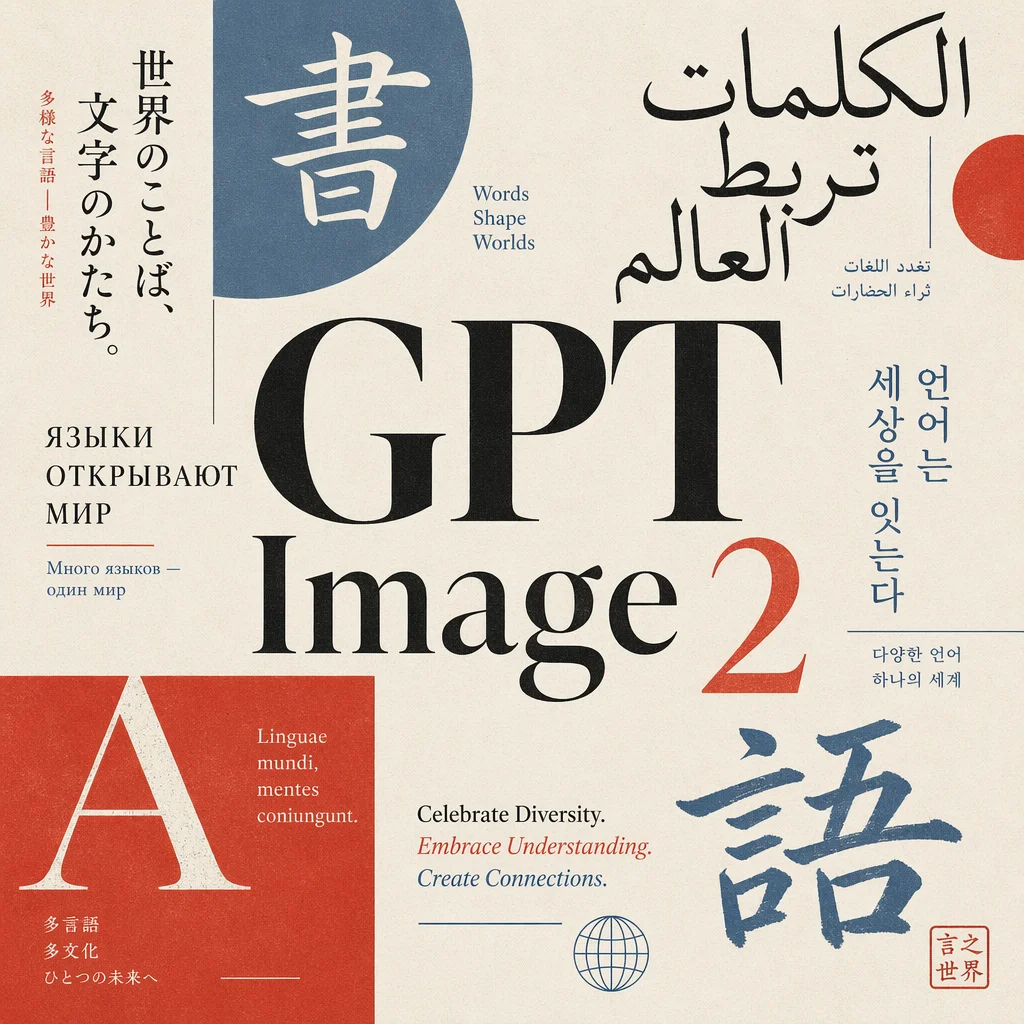
Résultat réel généré avec cette application
Sous le capot
Vous souhaitez plus de contrôle ?
Cette application repose sur un workflow AI-Flow entièrement modifiable. Changez le modèle, les prompts, la disposition ou la résolution, ou connectez-le à d’autres étapes.
Prompt
Generate a professional editorial poster focused on typography, celebrating global languages and writing systems. The composition is centered around the text "GPT Image 2", placed prominently in the middle as the main focal point. Surround the central text ...
GPT Image – Generate
Comment utiliser ce template
Étape 1 : Saisissez votre texte dans le nœud « Prompt »
Renseignez le nœud « Prompt » avec le texte demandé.
Generate a professional editorial poster focused on typography, celebrating global languages and writing systems.

The composition is centered around the text "GPT Image 2", placed prominently in the middle as the main focal point.

Surround the central text with a curated mix of multilingual typographic elements (Japanese, Arabic, Latin, Cyrillic, Hangul), arranged in a balanced, graphic layout inspired by modern Japanese editorial design.

Style: refined, minimal yet expressive, with strong grid structure, asymmetry, and clean negative space.

Color palette: vibrant but controlled — limited to 3–5 harmonious colors (e.g. deep black, off-white, muted red, soft blue, accent color). Avoid oversaturation.

Typography: high contrast between type styles (serif, sans-serif, calligraphic), with precise kerning and intentional hierarchy.

Texture: subtle paper grain or print effect to give a premium editorial feel.

Lighting and rendering: crisp, high-resolution, print-ready quality.

No mockups, no frames, no background clutter — pure poster design
Étape 2 : Exécutez le workflow
Cliquez sur le bouton « Exécuter » pour lancer le workflow et obtenir le résultat final.
Personnalisez le workflow sous-jacent
Ouvrez le workflow complet dans l’éditeur AI-Flow pour changer de modèle, réécrire les prompts ou le connecter à d’autres étapes.
À qui s’adresse ce template ?
Idéal pour les professionnels et les créateurs qui souhaitent simplifier leur workflow
Équipes marque et marketing
Créez des visuels de campagne, des affiches, des bannières et des supports localisés avec une typographie fidèle et un support multilingue, en réduisant le travail de mise en page manuel.
Designers et directeurs artistiques
Explorez des compositions éditoriales, des mises en page sur grille et des traitements typographiques mixtes qui restent fidèles à des prompts complexes et à votre hiérarchie.
Éditeurs et équipes éditoriales
Produisez couvertures, doubles pages, infographies et planches de BD (manga, manhwa) avec une meilleure lisibilité des écritures non latines.
Localisation et marketing international
Générez des visuels cohérents en japonais, coréen, chinois, hindi, bengali ainsi qu’en écritures latine et cyrillique pour vos campagnes mondiales.
Community managers et créateurs de contenu
Produisez des visuels immédiatement utilisables dans plusieurs formats, pour vos fils, stories et publicités, avec un texte et des éléments d’interface nets.
Designers produit et équipes UX
Maquettez interfaces, iconographies et compositions d’interface denses où la lisibilité des microtextes et des pictogrammes est essentielle.
Agences et directions de production créative
Industrialisez votre production créative grâce à un respect fiable des prompts, des rendus haute résolution et moins d’allers-retours en post-production.
Développeurs et équipes d’automatisation
Intégrez la génération d’images via l’API, avec des réglages contrôlables de taille, de qualité et d’arrière-plan pour alimenter vos workflows en aval.
Prêt à créer ?
Commencez à utiliser cette application
Aucune configuration requise — ouvrez l’application et commencez à créer en quelques minutes
Vous aimerez peut-être aussi
Explorez d’autres templates puissants pour enrichir votre workflow IA

Génération d’images avec GPT Image 2.5 Flare
Générez des images haute fidélité avec GPT Image 2.5 Flare, optimisé pour la typographie réaliste, les écritures multilingues, les mises en page structurées et les formats prêts à imprimer jusqu’en 4K, pour affiches, bandes dessinées, marketing, maquettes UI et réseaux sociaux.

Génération d’images avec GPT Image 2.5 Sunburst
Générez des images haute fidélité avec GPT Image 2.5 Sunburst, optimisé pour la typographie réaliste, les écritures multilingues, les mises en page structurées et les formats prêts à imprimer jusqu’en 4K, pour affiches, bandes dessinées, marketing, maquettes UI et réseaux sociaux.

Générateur IA de photos produit de soin
Transformez une seule image de crème, de sérum ou de pot cosmétique en shooting complet : une grille 2 × 2 et quatre visuels recadrés (plan large, plan moyen, gros plan, angle créatif), porté ou produit seul, pour l'e-commerce beauté, les marketplaces et la publicité.

Générateur IA de photos produit de crème solaire
Transformez une seule image de tube ou de flacon solaire en shooting complet : une grille 2 × 2 et quatre visuels recadrés (plan large, plan moyen, gros plan, angle créatif), porté ou produit seul, pour l'e-commerce beauté, les marketplaces et la publicité.

Générateur IA de mockups de t-shirts
Transformez une seule image de t-shirt en mockups print-on-demand portés : une grille 2 × 2 et quatre visuels recadrés (plan large, plan moyen, gros plan sur l'impression, angle créatif), pour Etsy, Shopify et vos boutiques POD.
Générateur IA de photos produit de sneakers
Générez des photos produit de sneakers à partir d'une seule image de chaussure : une grille 2 × 2 et quatre visuels recadrés (plan large, plan moyen, gros plan, angle créatif), en mode porté ou produit seul, pour vos fiches e-commerce, marketplaces et publicités.
Questions fréquentes
À quoi sert GPT Image 2 ?
C’est un modèle d’images de nouvelle génération axé sur la justesse typographique, le rendu multilingue et la cohérence des mises en page. Utilisez-le pour des affiches éditoriales, des visuels marketing, des bandes dessinées, des diapositives, des maquettes d’interface et des visuels sociaux nécessitant un texte lisible et un design structuré.
En quoi diffère-t-il des modèles d’images précédents ?
Par rapport aux versions antérieures, GPT Image 2 offre un meilleur raisonnement et une meilleure continuité de scène, un rendu de texte bien supérieur, un meilleur support des écritures non latines et un respect fiable des directions artistiques complexes — d’où des images plus exploitables, prêtes pour la production.
Sait-il restituer des textes et éléments d’interface petits et lisibles ?
Oui. GPT Image 2 est optimisé pour une typographie lisible, y compris les petites tailles, les compositions denses, les pictogrammes, les icônes et les règles typographiques subtiles comme la hiérarchie, l’espacement et l’alignement.
Quelles langues et quels systèmes d’écriture sont pris en charge ?
Il se comporte bien en alphabet latin, en cyrillique, en japonais, en coréen (hangul), en chinois, en hindi et en bengali. Il convient donc aux affiches multilingues, aux publicités localisées et aux formats BD nécessitant des écritures non latines.
Quelles tailles et quels formats sont disponibles ?
Le template prend en charge des ratios allant de l’ultra-large 3:1 à l’ultra-haut 1:3, ainsi que les préréglages carrés, paysage et portrait courants. Les options haute résolution incluent des configurations 2K et 4K, en paysage comme en portrait.
Le rendu est-il prêt à imprimer ?
Les rendus sont en haute résolution et conviennent à de nombreux workflows d’impression. Pour de l’impression professionnelle, vérifiez les profils colorimétriques, les fonds perdus et les marges en prépresse, et prévoyez un contrôle final de la typographie ou une vectorisation lorsque la précision de la marque est déterminante.
Puis-je générer des images à fond transparent ?
Oui. Le template propose un réglage d’arrière-plan transparent ou opaque, ce qui facilite l’intégration dans vos mises en page et compositions.
Ce template retouche-t-il des images existantes ?
Ce template se concentre sur la génération texte-vers-image à partir de prompts. Pour de la retouche ou de l’inpainting, utilisez un template d’édition d’images dédié.
Des conseils pour de meilleurs résultats en typographie et en mise en page ?
Soyez explicite sur la hiérarchie, la structure de grille, les blancs, les associations de polices (serif/sans serif/calligraphique) et les limites de palette. Précisez les langues et écritures ainsi que le format, et évitez les directions stylistiques contradictoires dans un même prompt.
Reproduira-t-il exactement les polices de ma marque ?
Le modèle peut imiter fidèlement des styles typographiques, mais il ne peut pas garantir vos polices propriétaires exactes. Pour une conformité stricte à votre charte, utilisez la composition générée comme base et finalisez la typographie dans votre outil de design.
Comment les images sont-elles renvoyées et comment les utiliser ?
Le template renvoie l’URL d’une image téléchargeable. Vous pouvez choisir la taille, la qualité et le réglage d’arrière-plan pour l’adapter à votre workflow web, social ou print.
Y a-t-il des limites à connaître ?
De légers écarts dans les détails du texte ou la mise en page peuvent survenir, et les contenus sensibles peuvent être modérés. Pour une retouche au pixel près ou une correspondance exacte des polices, finalisez dans un logiciel de design classique.
Qu’est-ce qu’AI-FLOW et comment peut-il m’aider ?
AI-FLOW est une plateforme d’IA tout-en-un qui vous permet de créer, d’intégrer et d’automatiser des workflows alimentés par l’IA grâce à une interface intuitive en glisser-déposer. Débutant ou expert, vous pouvez combiner plusieurs modèles d’IA pour créer des solutions innovantes sans écrire de code.
Un essai gratuit est-il disponible ?
Oui, AI-FLOW propose un essai gratuit pour commencer. Vous pouvez ensuite acheter des crédits selon vos besoins, sans abonnement ni engagement à long terme.
Puis-je intégrer mes clés API OpenAI, Replicate et d’autres fournisseurs dans la version Cloud d’AI-FLOW ?
Oui, vous pouvez facilement intégrer vos propres clés API à AI-FLOW. Les nœuds associés utiliseront alors votre clé, ce qui réduit considérablement votre consommation de crédits sur la plateforme.