
GPT Image 2.6 Sunburst
Generate images from a text prompt with OpenAI's GPT Image 2.6 Sunburst, detailed visual work version of GPT Image 2.6, with quality from low to max, a complexity setting and sizes up to 4K.
Price per run
from$0.042 credits
- ✓ No subscription
- ✓ Pay per generation
- ✓ Credits valid 12 months
Pricing
What GPT Image 2.6 Sunburst costs
You pay per generation. The app shows the exact price as you change the settings, before you click Generate.
One run costs $0.04–$1.96, depending on the options you pick.
Credit packs from $4.99 for 200 credits. No monthly plan. See all packs
How to Use the App
Here’s what you get when you open the app: a short form, one run button, your results — no nodes, no setup.
GPT Image 2.6 Sunburst
App previewFill in the form
Prompt
RequiredType your prompt…
Size
Requiredauto
Quality
Requiredhigh
Images
Add images or files
≈ 2–98 credits / run
Get your result
Real output generated with this app
What This App Does
GPT Image 2.6 Sunburst is OpenAI's latest image model in the GPT Image family, built for detailed visual work: dense compositions, precise edits and images where every element has to land. GPT Image 2.6 comes in two versions, Sunburst and Flare, which share the same token prices. Pick Sunburst when detail and precision matter more than speed; pick Flare for fast iteration.
The headline addition of GPT Image 2.6 is complexity control. The complexity setting decides how much the model plans before it renders. Low suits focused changes such as a new background or a sign; high helps with dense text, complex layouts and the relationships between objects, at the cost of more latency and a higher chance of unwanted changes. When you leave it at high, the model behaves as it does by default. Complexity has no separate fee; the quality setting still controls rendering quality.
Quality goes from low to max (low, medium, high, xhigh, max, or auto). Lower settings are good for quick drafts; compare the higher ones for final assets. GPT Image 2.6 renders noticeably more tokens than GPT Image 2.5 at low and medium quality, so those settings cost more than on 2.5, while high and above cost the same.
Sizes cover square, landscape and portrait presets, plus 2K and 4K options. OpenAI marks resolutions above 2560x1440 as experimental.
Through the API, this template also accepts optional reference images: when you send them, the model edits or restyles from those images instead of generating from scratch.
Key capabilities
Text-to-image generation with GPT Image 2.6 Sunburst
Complexity control (low, medium, high) for planning depth
Quality from low to max, plus auto
2K and 4K output sizes
Image editing from reference images through the API
Core inputs
Prompt (text, required) — describe the image, its layout, any text to render and the style
Size (select, optional) — auto, 1024x1024, 1536x1024, 1024x1536, 2048x2048, 2048x1152, 3840x2160 or 2160x3840; default 1024x1024
Quality (select, optional) — auto, low, medium, high, xhigh or max; default high
Images (image URLs, optional, API only) — reference images that switch the run to editing
Other Image models
Compare before you generate
Remix this appFor builders: open the workflow behind it to swap the model, chain steps, run batches or call it from the API.
Under the Hood
Want more control?
This app is powered by a fully editable AI-Flow workflow. Change the model, prompts, layout, resolution — or connect it to other steps.
Prompt
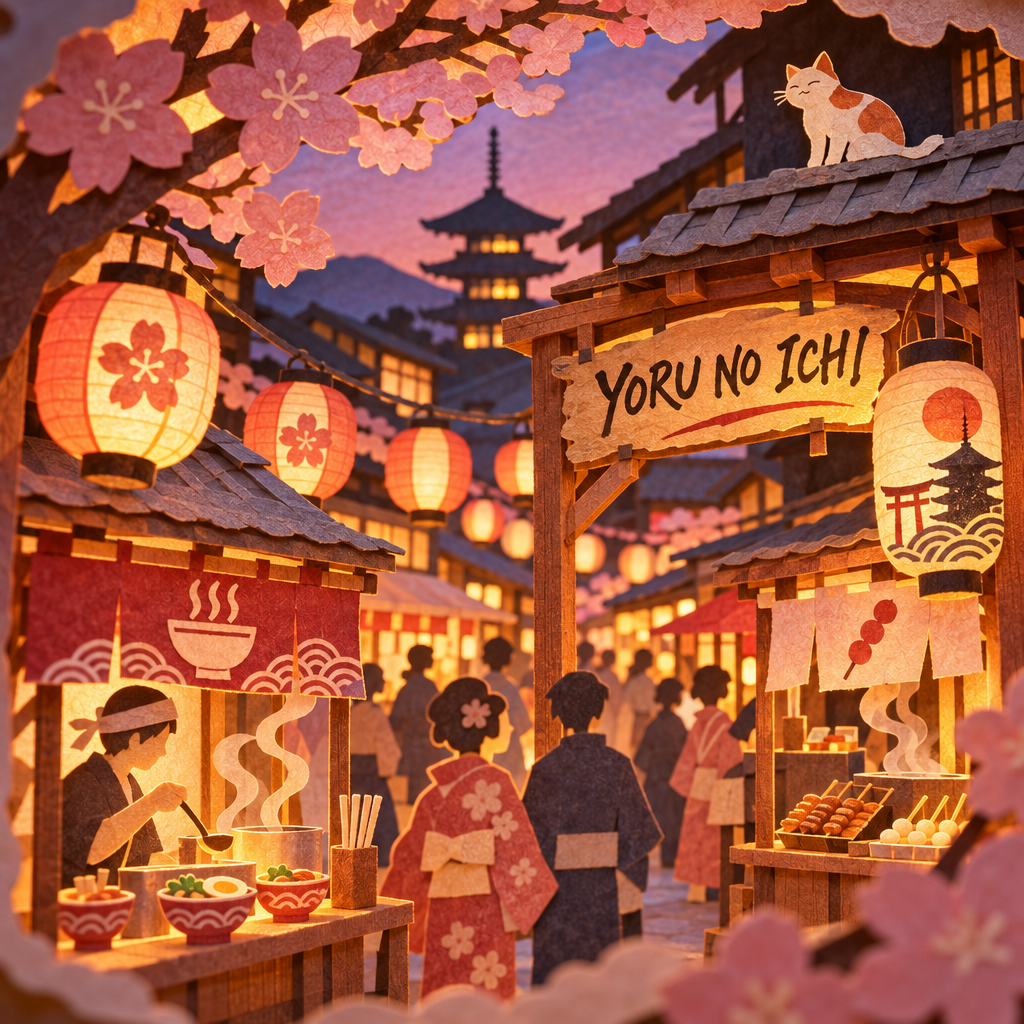
A detailed paper-cut diorama of a night market in Kyoto at dusk: layered paper lanterns, food stalls with tiny steaming bowls, a hand-lettered wooden sign reading "YORU NO ICHI", a cat on a rooftop, soft warm backlight through the paper layers, shallow dept...
GPT Image – Generate
How to Use This Template
Step 1: Enter your text in 'Prompt' Node
Fill the 'Prompt' node with the required text.
No example available.
Step 2: Run the Flow
Click the 'Run' button to execute the flow and get the final output.
Frequently Asked Questions
Do I need a subscription to use GPT Image 2.6 Sunburst?
No. Buy a credit pack once, generate, and come back whenever you want. Purchased credits stay valid 12 months, and every new purchase extends them.
What is GPT Image 2.6 Sunburst?
It is the detailed visual work version of OpenAI's GPT Image 2.6 image model. It generates images from a text prompt and can edit from reference images.
What is the difference between Sunburst and Flare?
OpenAI positions Sunburst for detailed visual work and Flare for fast iteration. Both share the same token prices and the same settings.
What changed from GPT Image 2.5?
GPT Image 2.6 adds the complexity setting. It also renders more tokens at low and medium quality, so those settings cost more than on 2.5; high and above cost the same.
What does the complexity setting do?
It controls how much the model plans before rendering. Use low for focused edits like a background or a sign, and high for dense text, complex layouts and object relationships. High is the default.
Does a higher complexity cost more?
Complexity has no separate fee. Higher complexity can take longer and may introduce unwanted changes, so compare results for your task.
What sizes can I generate?
Square, landscape and portrait presets from 1024 pixels, plus 2048x2048, 2048x1152, 3840x2160 and 2160x3840. OpenAI calls resolutions above 2560x1440 experimental.
What drives the price of a run?
OpenAI bills per token, so the price depends on the size, the quality and, for edits, the reference images. Larger sizes and higher quality cost more; the final charge follows the usage OpenAI reports.
Can I edit an existing image?
Yes, through the API: send one or more reference image URLs in the images input and the run switches to editing. In the app, this template generates from the prompt.
Does this template output SVG or animated GIF?
No. GPT Image 2.6 can produce SVG and animated GIF through OpenAI's API, but this template returns a regular image.
Any prompting tips?
Describe the subject, the layout, any exact text in quotes and the style. For dense text or complex scenes keep complexity high; for small targeted edits try low.
How do I know what a generation will cost?
The app shows the exact price on the Generate button and updates it as you change the settings, before anything is billed.
Is there a free trial available?
Yes, AI-FLOW offers a free trial to get you started. After that, you can purchase credits as needed—no subscription or long-term commitment required.