
Grok Imagine Image 2.0
Generate images from a text prompt with xAI's Grok Imagine Image 2.0, the Quality Mode model behind Grok Imagine, with close instruction following, sharp typography, 1K or 2K output and 13 aspect ratios.
Price per run
from$0.084 credits
- ✓ No subscription
- ✓ Pay per generation
- ✓ Credits valid 12 months
Pricing
What Grok Imagine Image 2.0 costs
You pay per generation. The app shows the exact price as you change the settings, before you click Generate.
One run costs $0.08–$0.18, depending on the options you pick.
Credit packs from $4.99 for 200 credits. No monthly plan. See all packs
How to Use the App
Here’s what you get when you open the app: a short form, one run button, your results — no nodes, no setup.
Grok Imagine Image 2.0
App previewFill in the form
Prompt
RequiredType your prompt…
Aspect Ratio
Optional1:1 (Square)
≈ 4–9 credits / run
Get your result
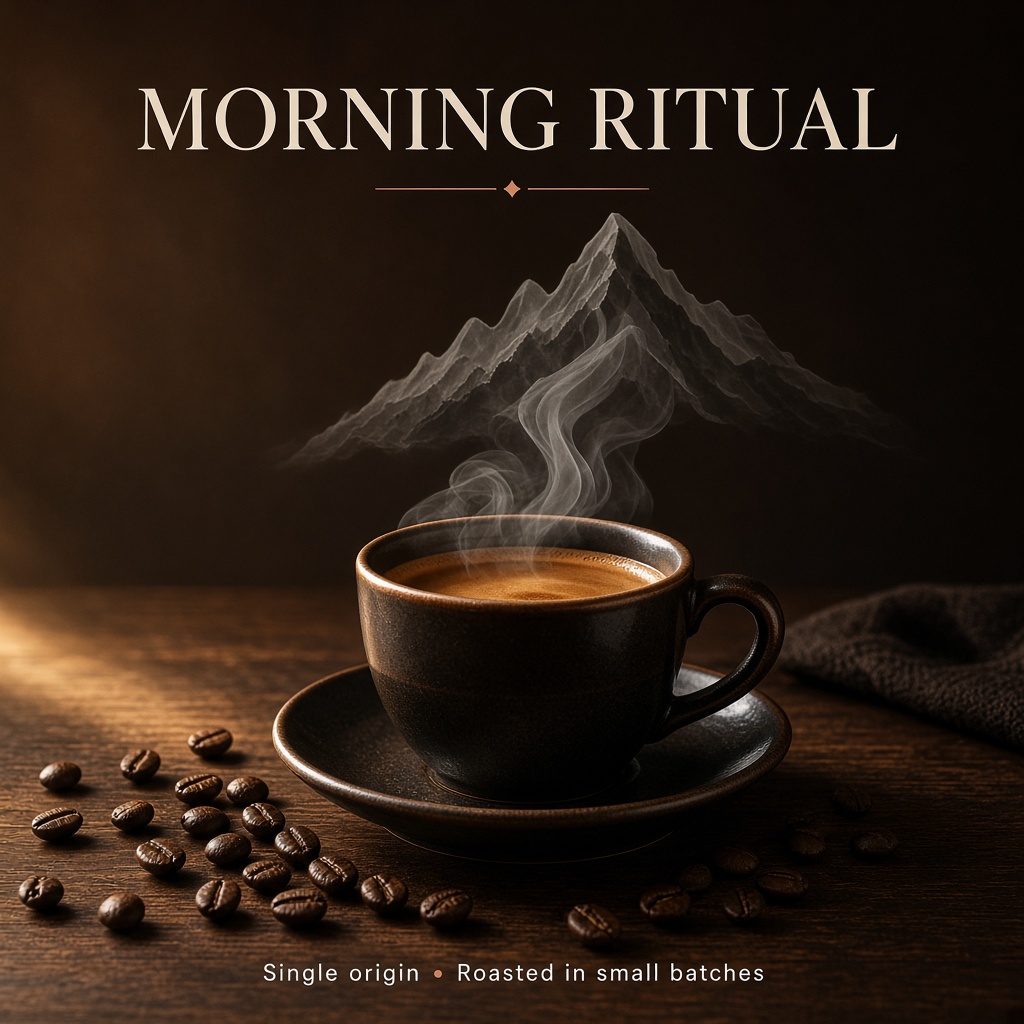
Real output generated with this app
What This App Does
Grok Imagine Image 2.0 is xAI's quality-focused image model, released in August 2026 as the Quality Mode of Grok Imagine. xAI trained it for fidelity across photography, design and illustration, with an emphasis on following instructions down to the details and on planning typography and layout so that dense, multi-part visuals hold together and small text stays sharp.
This template keeps the launch simple: write a prompt, pick an aspect ratio and run it. Resolution and quality are set on the model node, so you can iterate cheaply at 1K low quality and switch to 2K or medium quality for final assets. Each run returns a directly usable image URL that you can download or pass on to the next step of a workflow.
Compared with the original Grok Imagine Image, which stays available as its own template, version 2.0 adds a quality setting and a 2K tier, and is aimed at work where layout, legibility and detail matter: posters, product shots, social visuals, covers, infographics and concept art.
Key capabilities
Text-to-image generation with close instruction following
Typography and layout planned for dense, multi-part visuals with sharp small text
Photography, design and illustration styles
1K or 2K output, with low or medium quality
13 aspect ratios, from square 1 — 1 to wide 20:9 and tall 9:20
An edit mode on the same node that transforms one reference image from a text instruction
Core inputs
Prompt (text, required) — the subject, composition, style, lighting and any exact text to render.
Aspect ratio (select, optional, default 1 — 1): 1:1, 16:9, 9:16, 4:3, 3:4, 3:2, 2:3, 2:1, 1:2, 19.5:9, 9:19.5, 20:9 or 9:20.
Resolution (node setting, default 1K) — 1K or 2K.
Quality (node setting, default low) — low or medium. Price grows with resolution and quality.
Other Image models
Compare before you generate
Remix this appFor builders: open the workflow behind it to swap the model, chain steps, run batches or call it from the API.
Under the Hood
Want more control?
This app is powered by a fully editable AI-Flow workflow. Change the model, prompts, layout, resolution — or connect it to other steps.
Prompt
A premium editorial poster for a specialty coffee roastery. Center stage: a glossy ceramic cup of espresso on a dark walnut table, a thin swirl of steam rising and curling into the shape of a mountain range. Morning light from the left, warm rim highlights,...
Grok Image – Generate
How to Use This Template
Step 1: Enter your text in 'Prompt' Node
Fill the 'Prompt' node with the required text.
A premium editorial poster for a specialty coffee roastery. Center stage: a glossy ceramic cup of espresso on a dark walnut table, a thin swirl of steam rising and curling into the shape of a mountain range. Morning light from the left, warm rim highlights, coffee beans scattered in the foreground with sharp macro detail. At the top, large elegant serif headline reading "MORNING RITUAL"; at the bottom, a small clean sans-serif line reading "Single origin · Roasted in small batches". Refined layout with generous margins, cream and deep espresso brown palette with a single copper accent, photorealistic, magazine quality.
Step 2: Run the Flow
Click the 'Run' button to execute the flow and get the final output.
Frequently Asked Questions
Do I need a subscription to use Grok Imagine Image 2.0?
No. Buy a credit pack once, generate, and come back whenever you want. Purchased credits stay valid 12 months, and every new purchase extends them.
What is Grok Imagine Image 2.0?
It is xAI's quality-focused image model, released in August 2026 as the Quality Mode of Grok Imagine. It is built for close instruction following, sharp typography and fidelity across photography, design and illustration.
How is it different from the original Grok Imagine Image?
Version 2.0 targets higher fidelity, adds low and medium quality levels and a 2K resolution. The original model is cheaper and stays available as its own template for fast, budget-friendly drafts.
How do I use this template?
Write a detailed prompt, choose an aspect ratio and run it. You receive an image URL that you can download or connect to other nodes.
Which resolutions and quality levels are available?
1K or 2K, each in low or medium quality, set on the model node. Start at 1K low to explore ideas, then switch to 2K or medium quality for final assets.
What drives the price?
Resolution and quality: 1K low is the cheapest setting and 2K medium the most expensive. The node shows the exact credit cost of each combination.
Which aspect ratios are supported?
Thirteen: 1:1, 16:9, 9:16, 4:3, 3:4, 3:2, 2:3, 2:1, 1:2, 19.5:9, 9:19.5, 20:9 and 9:20, covering square posts, slides, stories and wide banners.
Can it render text inside the image?
Yes. xAI designed it to plan typography and layout like a designer, so posters and multi-part visuals keep legible text. Put the exact wording in quotes in your prompt.
Can I edit an existing image?
Yes. Switch the node to its edit mode, connect one reference image and describe the change. This template is set up for text-to-image by default.
How should I write prompts?
Describe the subject first, then composition, style, lighting and mood, and quote any text that must appear. Specific, concrete details give the most faithful results.
Can I call it through the API?
Yes. The template's API flow takes a prompt and an optional aspect ratio and returns the image URL, so you can generate images from your own code.
How do I know what a generation will cost?
The app shows the exact price on the Generate button and updates it as you change the settings, before anything is billed.
Is there a free trial available?
Yes, AI-FLOW offers a free trial to get you started. After that, you can purchase credits as needed—no subscription or long-term commitment required.